
Counter-trend trading is scary. But if you target only the “failure break,” the story changes. An MT5 counter-trend EA that’s friendly for beginners: "PivotFade Pro"
Hello.
This may come as a surprise, but have you ever had an experience like this?
If you thought, “It broke to the upside!” and bought,
you get stopped out and it comes back.
If you thought, “It broke to the downside!” and sold,
it reverses again and you get stopped out.
This is a very common losing pattern in FX trading.
In the market world, such “false breakouts” are called
“traps (failed breaks).”
In fact, these traps are not only a source of losses, but
they can also become a chance to win if used correctly.
The EA (automatic trading tool) we will introduce
“PivotFade Pro (Pivot Fade Pro)”
is precisely for trading these “traps,”
and is a MT5-exclusive tool specialized for counter-trend trading.

─────────────────────────────
■ What is “counter-trend trading”? What is a “Pivot”?
─────────────────────────────
Words become a little difficult, so
let’s first organize them in simple terms.
・Trend-following (framing) … Buy when the market is going up, sell when it is going down. A way to “ride the wave.”
・Counter-trend … When prices have risen too much or fallen too far, enter in the opposite direction, expecting a bounce.
Counter-trend trading feels good when it hits, but
if your timing is too early, you can get hurt badly as you get carried along.
That’s why rules on where to enter are very important.
This is where the “Pivot” comes in.
A pivot is a price line calculated from the price action up to the previous day,
a price level that many traders watch.
Because many traders are watching it, price tends to pause or rebound near this line.
In short,
the idea is “base your counter-trend trades on the pivot line and aim only for traps.”
—This is PivotFade Pro’s core concept.
─────────────────────────────
■ PivotFade Pro’s “smart points”
─────────────────────────────
This EA is not a simple tool that just goes counter-trend when price hits a line.
With the following 3 steps,
it determines whether it is a true trap and then executes.
Step 1: Wait for a breakout (wait for the line to be broken)
Step 2: After the breakout, watch whether price returns (arm yourself)
Step 3: If price returns inside the line, place an order (which confirms a failed breakout)
It does not enter on an “only breakout.”
It only acts when there is a pattern of “break, then return,”
so it helps avoid weak counter-trend entries.
───────────────
■ This is the selling point (5 beginner-friendly features)
────────────────────────
【1】 Both stop loss and take profit are automatic
Managing entries afterward is actually the hardest part.
PivotFade Pro can
・automatically set stop loss
・secure profits in 3 parts via “split take profit”
・move to break-even automatically
・trail profits to extend gains
All automated.
This reduces the anxiety of “entering and not being able to sleep.”
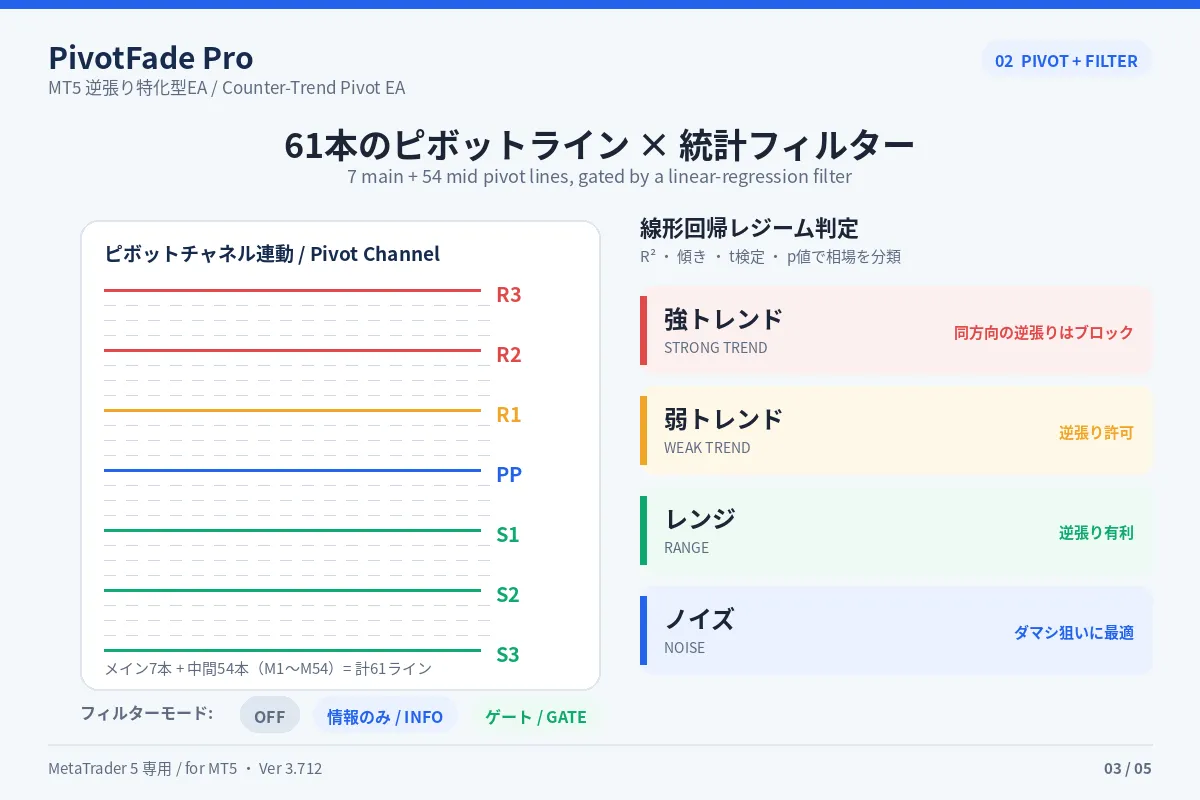
【2】 Automatic stop for dangerous counter-trends
What’s scariest in counter-trend trading is entering against a strong trend.
This EA automatically analyzes market conditions and,
when a strong trend is unfavorable to counter-trend entries,
it automatically skips entries.
It blocks reckless counter-trend attempts by beginners.
【3】 Risk is specified as a percentage
Just set “what percent of your account you’re willing to risk per trade.”
The EA then automatically calculates the lot size.
No need to worry about “how much to buy.”
Initial setting is modest at 1%, so you can start safely as is.
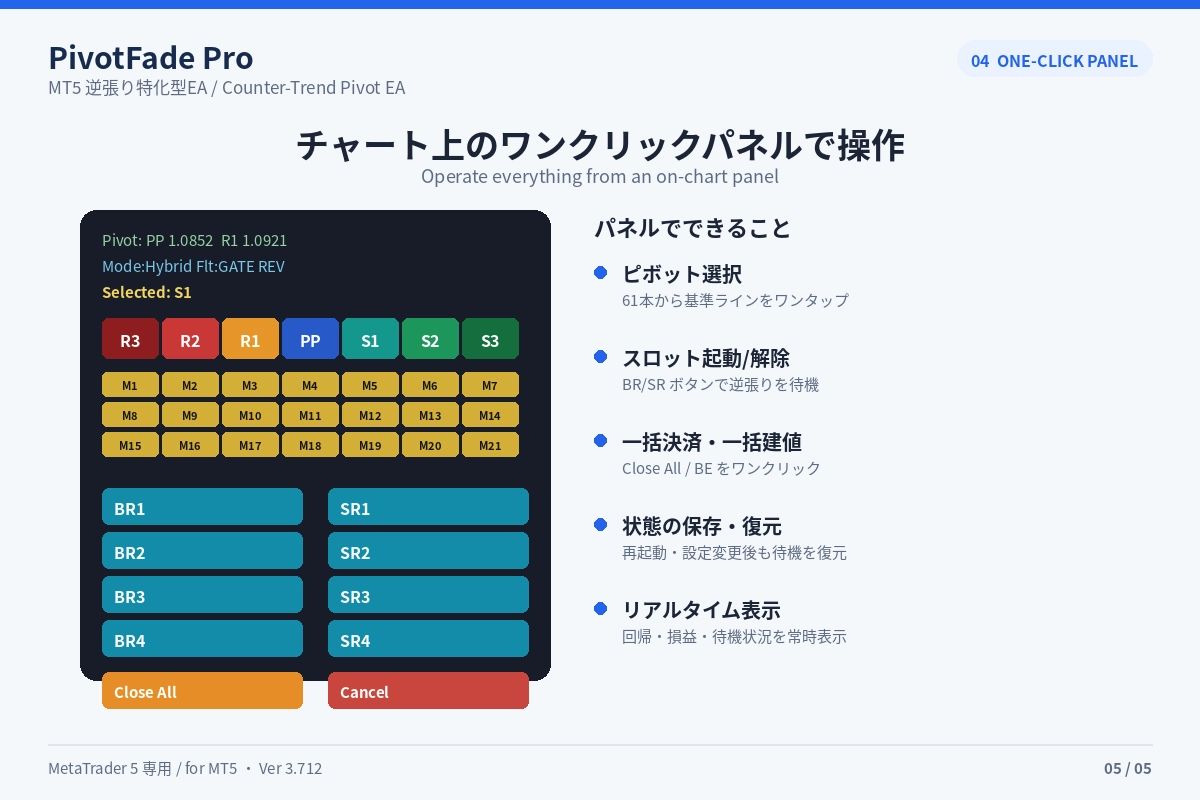
【4】操作 is one-click on the chart
An control panel appears at the top-right of the screen.
Select the “target line,”
then press the button for “Buy” or “Sell.”
Then the EA waits and moves automatically when a chance comes.
It’s not a complete passive setup; rather, it’s a balanced approach of “you decide whether to enter, and let the EA handle the tedious work.”
This is the best of both worlds.
【5】 Free exclusive indicator included
The Pivot Channel indicator required by this EA is included as a free bonus for purchasers.
No need to buy separately.
You can start using it right away after purchase.
─────────────────────────────
■ How to use in just 3 steps
─────────────────────────────
Choose the pivot line you want to target
Press the “counter-buy” or “counter-sell” button
Then the EA automatically manages from entry to exit
No complicated settings needed.
First try it with the default settings on a demo account to observe how it moves.
─────────────────────────────
■ Who is this recommended for
─────────────────────────────
・People who always lose on false breakouts
・People who want to counter-trend but don’t know when to enter
・People who struggle to manage stop losses and take profits after entry
・People who want to minimize effort but avoid full auto (semi-automatic users)
・People who want to counter-trend in gold or fast-moving instruments
─────────────────────────────
■ Finally (an important request)
─────────────────────────────
No tool is perfectly winning all the time.
Markets can incur losses depending on conditions.
That’s why,
please first test with a demo account or a small amount to verify the movements with your own eyes before using it.
PivotFade Pro will be
a reliable partner that elevates your counter-trading to the next level.
I’d be glad if it could become that for you.
Thank you for reading to the end.
─────────────────────────────
■ Product information
─────────────────────────────
Product name: PivotFade Pro (Pivot Counter-Trend Specialization EA)
Supported: MetaTrader 5 (MT5) only; MT4 not supported
Type: Semi-automatic (discretionary assist)
Bonus: Free exclusive indicator “Pivot Channel” included
▼ Product page here