

FX Beginners Guide|Thoughts on Building a Trading Method Using Higher Timeframe Lines
With MFZ Auto SR
Decide where to look, and your method-building begins
The lines are not trading signals.
What matters is decidingwhat to wait forwith the lines.
※This article explains how to view charts and create scenarios using MFZ Auto SR. It does not recommend trading or guarantee profits. Final decisions should be based on your own rules and risk management.
The reason a method isn’t decided is because the “place to look” isn’t decided
When you start FX, many people first trip over the question, “Where should I buy?” and “Where should I sell?”
Add indicators. Look at moving averages. Look at RSI. Look at MACD. Yet when you open a chart, you still don’t know where to wait.
This state tends to create a phenomenon known as “method refugee.”
But, please change your thinking here for a moment. A method is not about instantly seeking entry signals.
What matters first is
to decide “which price range to wait for.”
Which price range to wait for, and what to check there. Whether to aim for a rebound or a break. whether to enter immediately or wait a little longer to confirm.
Creating this story in advance is the first step in method-building.
Method-building starts with deciding where to look

MFZ Auto SR is an indicator that displays lines that tend to be observed on higher-timeframes
MFZ Auto SR is an indicator that automatically displays on the MT4 chart candidate support and resistance levels that are likely to be noticed on higher timeframes.
What is displayed are not random horizontal lines. Based on price ranges that have been frequently observed in past movements, it shows higher-timeframe lines such as H1, H4, daily, and weekly on the chart.
What matters here is that MFZ Auto SR does not produce buy/sell signals.
It does not guarantee that price will rebound at this line.
It does not guarantee a win if you buy here.
It does not say you should sell here.
It is not an automatic trading EA either. It does not guarantee profits.
MFZ Auto SR’s role is purely environmental awareness.
What upper-timeframe lines exist above the current price, what support candidates lie below, and what reaction to wait for when the price approaches that line.
This is a helper tool for thinking about these things.
The important thing is to remember the moment when the line is displayed
When MFZ Auto SR is shown on the chart, lines for higher-timeframe support and resistance candidates are drawn automatically on the current chart.
What’s important here is not just the line. It’s the position of the labels displayed with the line.
On the chart, you’ll see labels indicating timeframes like “H1,” “H4,” “D1,” “W1,” and information indicating resistance/support.
In particular, when auto-update is turned OFF, the position where these labels appear can be viewed asthe place where the line was already displayed at that momentas of that time.
In the morning: the line and labels appear
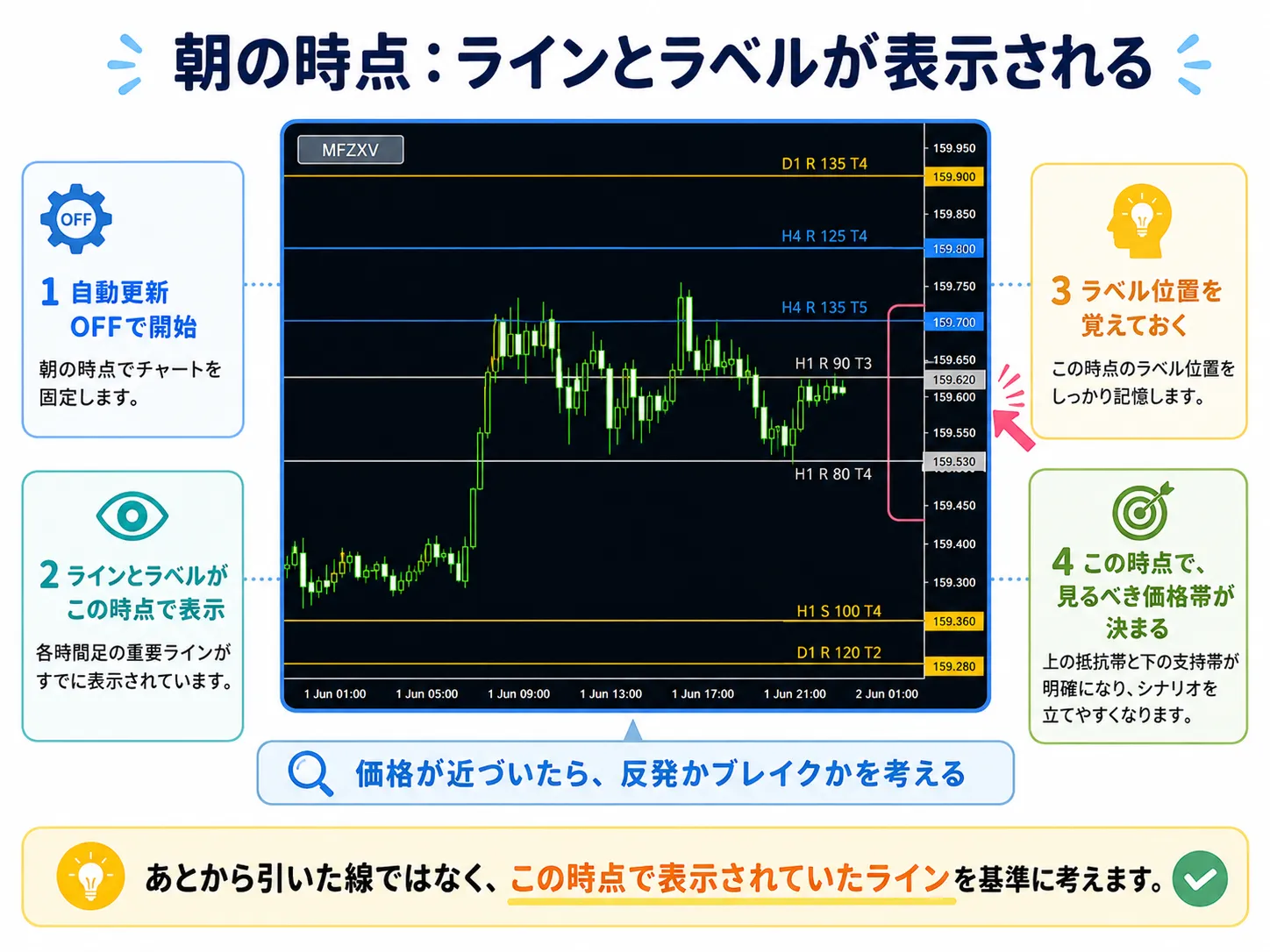
If you display MFZ Auto SR in the morning and fix it with auto-update OFF, the lines shown at that time are lines you could have confirmed in the morning.
At this moment, the price ranges you should watch are already decided.
What to do when the price approaches that line? wait for a rebound, or wait for a break. after it briefly moves away, see if it returns. or wait for a trend change per Dow Theory.
At the moment the line is displayed, you can think about the future price movement’s story.
If auto-update is OFF, you can fix the line and observe the subsequent reaction
MFZ Auto SR has an ON/OFF for auto-update.
If auto-update is ON, lines are recalculated periodically to suit the current market situation.
Conversely, turning auto-update OFF fixes the displayed lines and lets you observe future price movements.
For example, if you display MFZ Auto SR in the morning and turn auto-update OFF, at that time a label near the latest candle is displayed.
As time passes and candles extend to the right, the label near the latest candle will gradually appear to the left on the chart.
This does not mean the line moved by itself. Quite the opposite—the line shown in the morning remains fixed, while new candles form to the right.
Morning display line remains fixed,
and new candles form to the right afterward.
After some time: look to the right of the labels
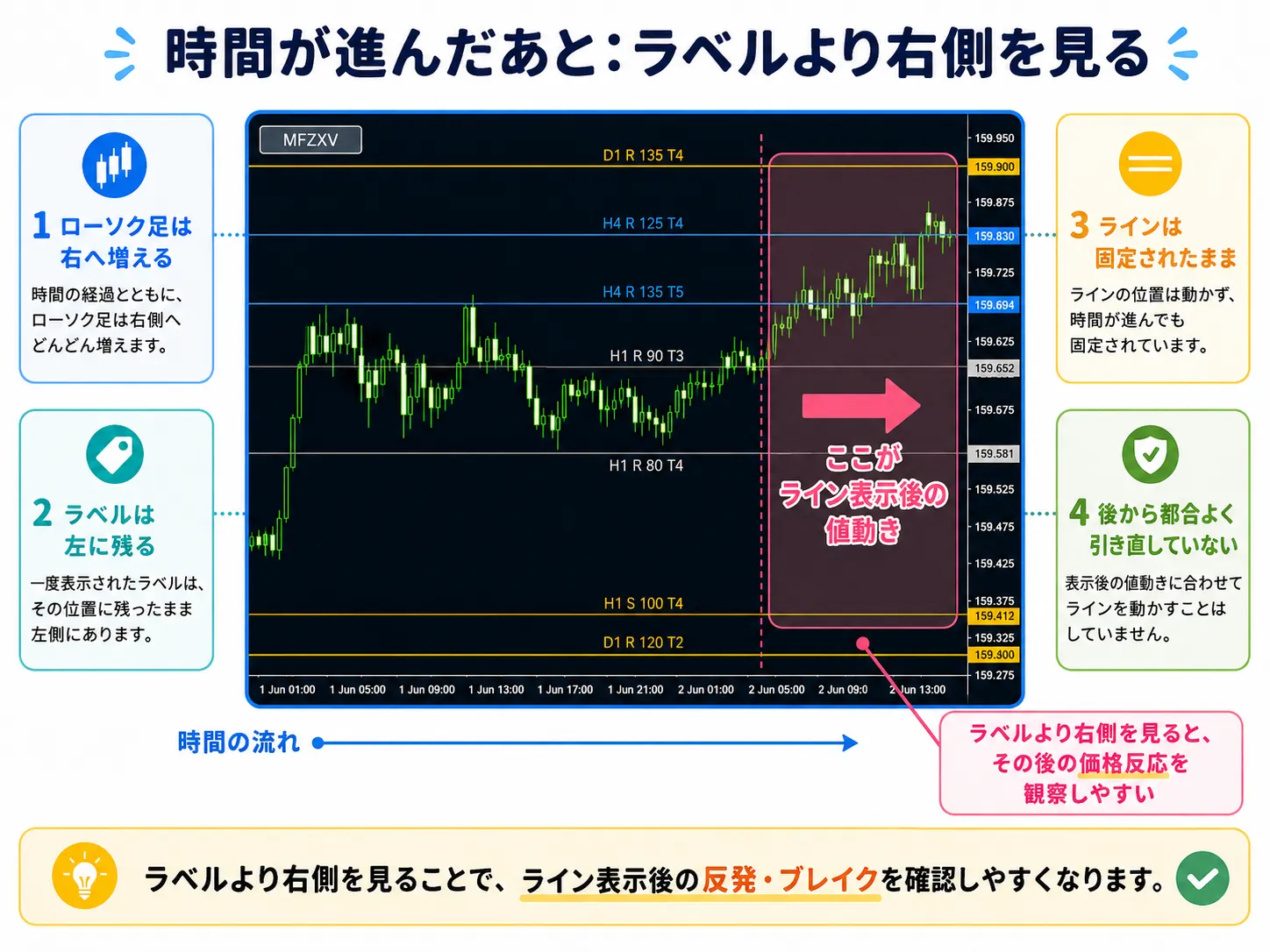
That is, price action to the right of the labels can be viewed asprice action formed after the line was displayedas of that time.
When beginners read explanations of horizontal lines and see things like, “Wasn't this line drawn where price later reacted?” they might feel that way.
However, when MFZ Auto SR is used with auto-update OFF, the morning-displayed lines are fixed, and you can observe subsequent price reactions.
Therefore, you’re not drawing lines where reactions occurred after the fact; you’re checking how price reacts to the lines that were already displayed.
Three candlestick reactions that indicate a line is being watched
When MFZ Auto SR reveals a line, what to look at next is, “How will price react as it approaches that line?”
Lines are not trading signals. They are a reference indicating where price may react strongly.
For example, imagine price rising from below and there is a resistance line near the top.
Three reactions that indicate the line is being watched
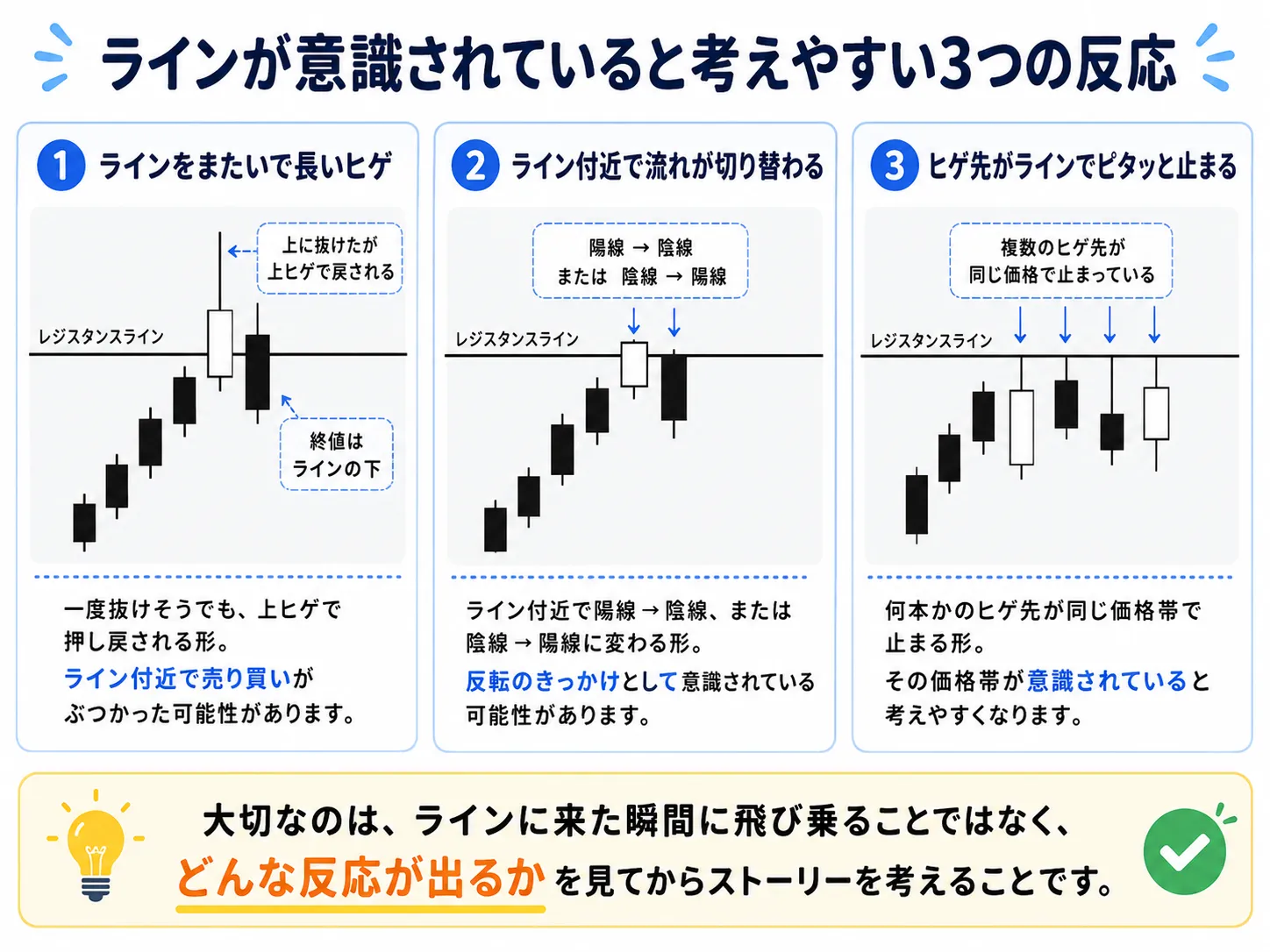
1) Price crosses the line and forms a long wick
After price crosses the line, it forms a long wick and is pushed back. It looks like it attempted to break through, but buying was insufficient and sellers pushed it back above the line’s price range.
2) Reversal candles near the line
Prices rising from below stop near the resistance line, followed by a bearish candle. Or prices falling toward a support line stop there, followed by a bullish candle. This is a situation where candle flow changes near the line.
3) The wick tip snaps near the line
The wick tip of candles stops near the line. If several candles’ upper or lower wicks stop at the same price range, it suggests the line is being watched.
None of these three reactions are trading signals themselves.
What matters is after such reactions near the line: whether to aim for a rebound, wait for a break, enter immediately, or wait a bit longer to confirm.
There are four ways to target the same line
Suppose MFZ Auto SR shows a line, and price approaches near that line. Also, a long wick appears near the line. The candlestick changes from bullish to bearish. The wick tip stops at the line.
If such reactions become visible, next consider, “How should I use this reaction?”
Even if looking at the same line, traders’ targets vary.
Four ways to use the line
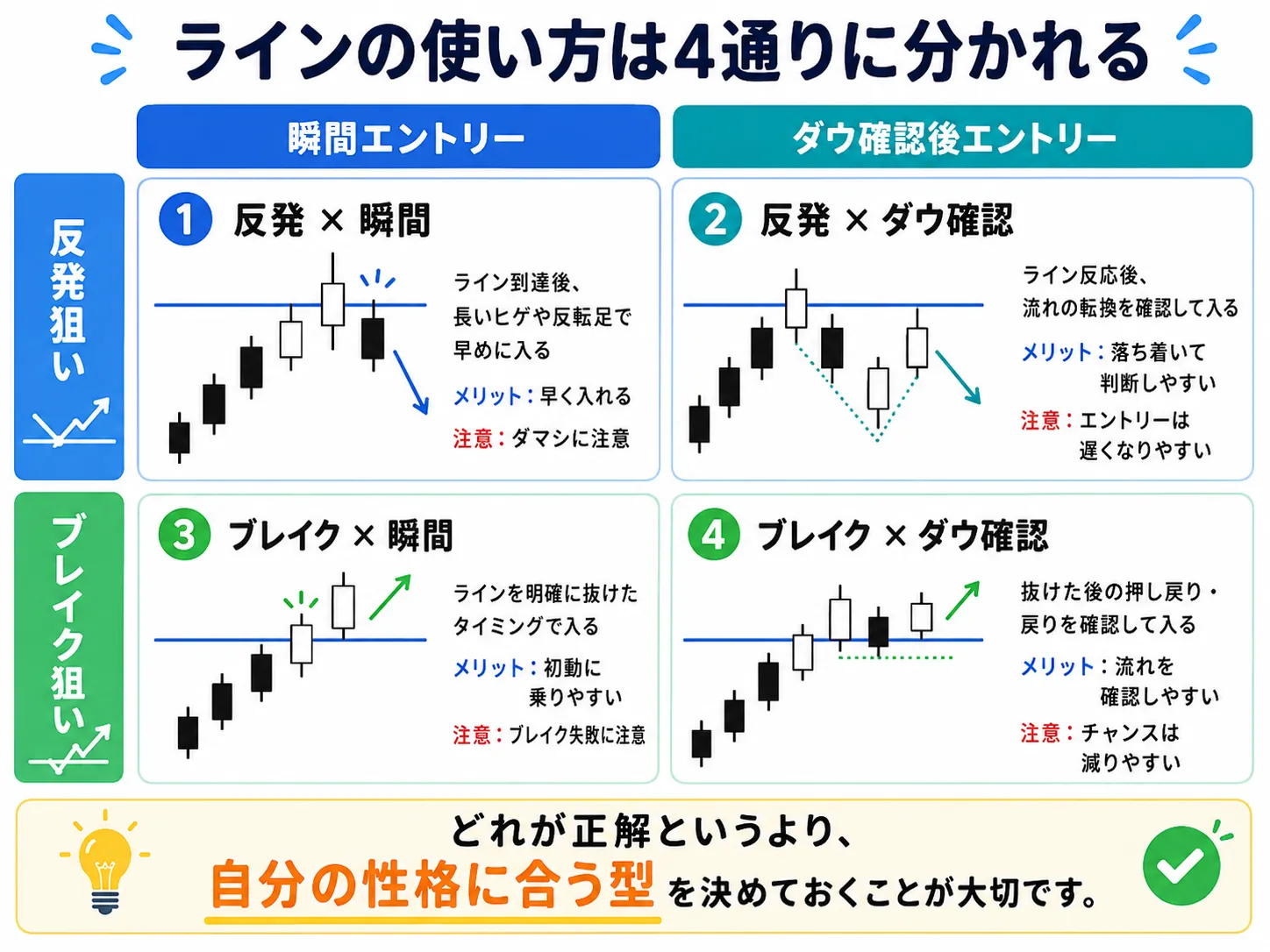
Two axes determine it.
1) Whether to target a rebound or a break against the line.
2) Timing of entry: enter on the reaction moment or enter after Dow Theory confirms the trend.
1. Rebound target × Instant entry
2. Rebound target × Entry after Dow confirmation
3. Break target × Instant entry
4. Break target × Entry after Dow confirmation
1) Rebound target × Instant entry
When price reaches the line or a long wick/ reversal candle appears near the line, enter in the direction of the rebound early.
Merits include entering at an early stage. However, since a reversal isn’t confirmed yet, there is a risk of a false breakout.
2) Rebound target × Entry after Dow confirmation
Do not enter at the moment of the reaction; wait to confirm the trend has changed through subsequent price action.
This allows calmer judgment, but entry can be slower.
3) Break target × Instant entry
Enter quickly at the moment price clearly breaks through the line.
It’s easier to catch the initial break, but beware of false-breaks where price appears to break and then reverses.
4) Break target × Entry after Dow confirmation
Don’t enter at the moment of the break; wait for a pullback or retest after the break to enter.
It’s easier to confirm the break, but waiting for confirmation often reduces opportunities.
Rather than which is correct,
it’s important to choose a style that matches your personality and testing results.
When MFZ lines are far away, you don’t have to wait eagerly
While actually looking at charts, you may think, “MFZ line is displayed but far from the current price.”
This is a very natural question.
The lines displayed by MFZ Auto SR are candidates for support/resistance that tend to be watched on higher timeframes. Therefore, they may appear very close to current price or somewhat distant.
Markets do not always move in a straight line to MFZ lines. They can react at other price ranges before reaching the line.
PivotMatrixPro is helpful when lines are far away
So another useful aid is a separate product under developmentPivotMatrixPro.
PivotMatrixPro is an indicator that can display Pivot lines, considered by traders worldwide, on the chart.
It supports not only daily pivots but also weekly, monthly, and pivot points for 4-hour and 1-hour timeframes. Therefore, you can check not only major higher-timeframe levels but also nearby price ranges convenient for shorter timeframes.
Also, you can toggle the display of Pivot lines with a single button, so you can show them only when needed.
When MFZ lines are far, view pivots as a supplementary aid
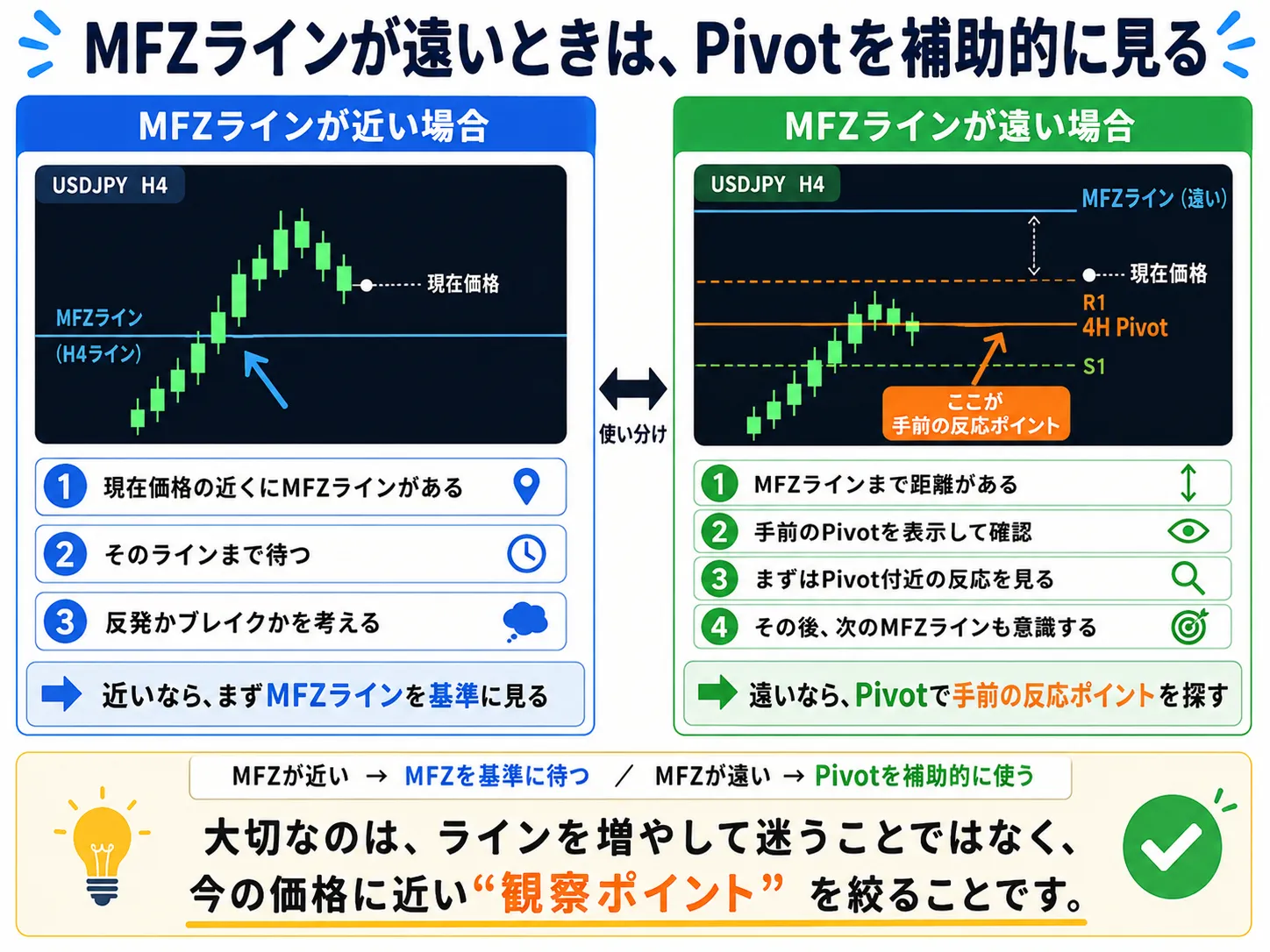
When MFZ lines are quite far from the current price, to see if there are lines likely to be observed beforehand, display PivotMatrixPro.
If there is a Pivot line close to the current price, treat it similarly.
Whether aiming for a rebound or a break, whether to enter instant or after Dow confirmation.
In other words, the fundamental thinking is the same for MFZ and Pivot. The difference lies in which line you base your decisions on.
Actual usage is: “Show line → wait → observe reaction”
So far, I have explained how to create trading stories using lines displayed by MFZ Auto SR.
Finally, I will simplify the actual flow.
1. Display MFZ Auto SR on the chart
2. Check if there is an MFZ line near the current price
3. If close, wait for the MFZ line
4. If far, display Pivot as a supplementary aid
5. Observe candlestick reactions near the line
6. Decide rebound or break
7. Decide instant entry or Dow confirmation afterward
What matters in actual trading is not increasing the number of line types. It is deciding which price ranges to observe relative to the current price.
Lines are not about predicting the future
So far, I’ve explained how to view lines with MFZ Auto SR, how to read reactions, and how to categorize methods.
However, one final thing I want to tell you is.
Lines are not destined to predict the future.
Even if price approaches a line shown by MFZ Auto SR, it does not necessarily rebound. Breaking the line does not guarantee a successful breakout.
Pivot lines behave similarly. Price may react near a pivot, but it does not always rebound.
MFZ Auto SR and PivotMatrixPro are not trading signals. They are tools to assist environmental awareness and organize which price ranges to focus on.
The final trading decision must always be based on your own rules, capital management, and stop-loss settings.
Summary: not only find lines, but decide what to wait for at the lines
MFZ Auto SR is an indicator that displays support and resistance candidates that tend to be observed on higher timeframes.
It helps beginners with common areas of confusion, “What should I look at?” “Which price range should I wait for?” “How should I use horizontal lines?” as a tool to assist.
However, simply displaying lines is not the method itself.
What matters most is what you wait for at those lines.
Chart perspectives changed by MFZ Auto SR
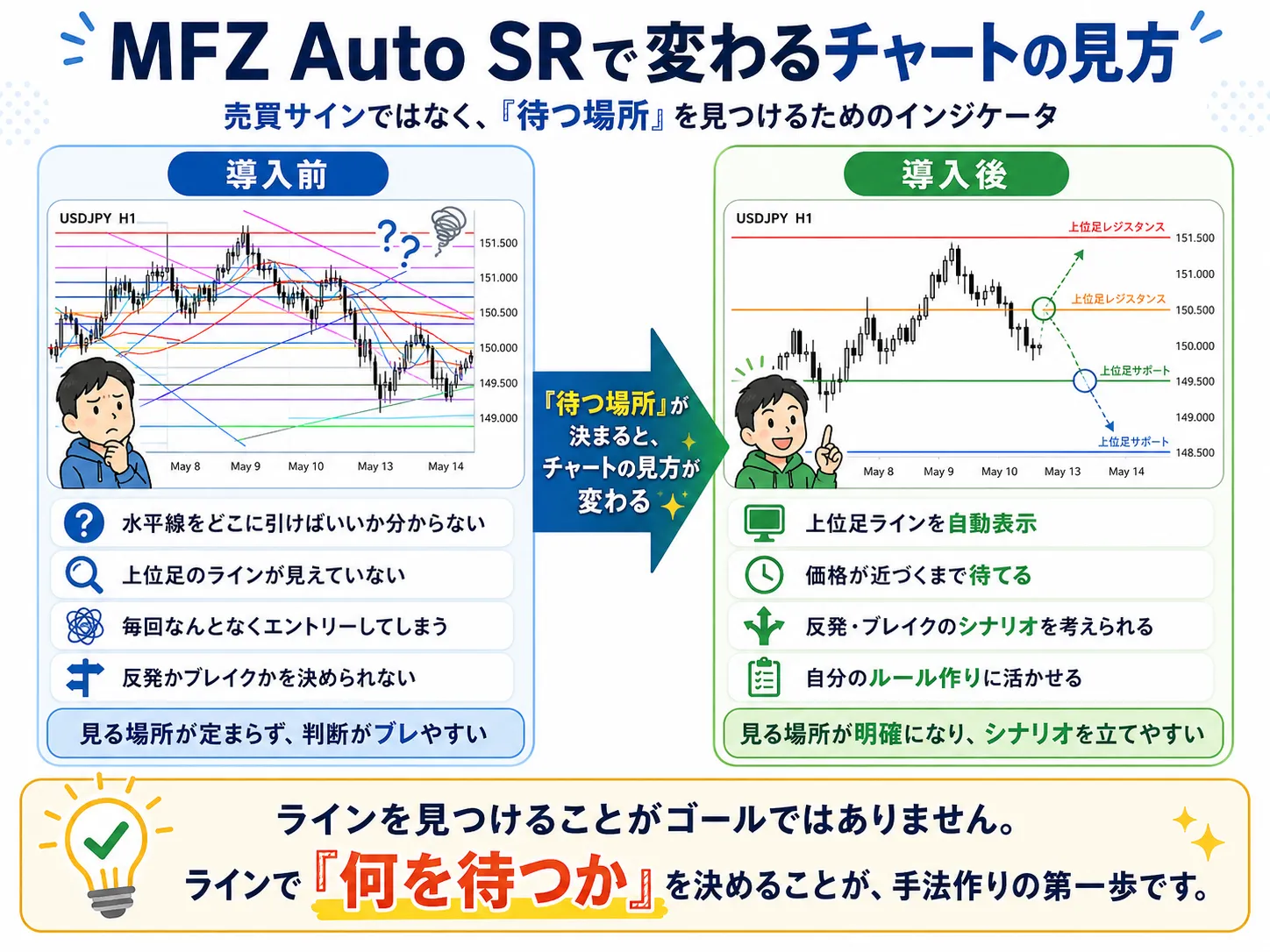
When a line is reached, do you wait for a rebound? When you break the line, do you look for a breakout? Do you enter at the moment of reaction? Do you confirm with Dow Theory before entering?
By building your own story around lines in this way, you finally approach your own trading rule set.
Method-building isn’t about stuffing in complex logic. It starts with deciding where to look.
Using higher-timeframe lines
for those who want to build their own trading story
Finding horizontal lines is difficult.
Watching higher-timeframe lines is challenging.
Not sure where to wait.
If so, check MFZ Auto SR.
When MFZ lines are far away, Pivot can help as a supplement
View higher-timeframe lines with MFZ.
View nearby reaction points with Pivot.
Then, build your trading story against those lines.
※The content of this article is intended to provide general information for investment decisions. It does not endorse specific trades. FX trading involves risk, including loss of principal. Please execute actual trades based on your own judgment and responsibility.