

"AI Breakout Line" An EA trading system where AI analyzes the chart, detects breakout points, and automatically enters trades.
We will publicly publish the source code of "AI Breakout Line" for a fee.

Please try the free version first
If you are considering purchasing this tool,be sure to test it with the free version firstto verify its operation.
AI Breakout Line is not the type that can be used immediately just by placing it into MT4/MT5 like a typical EA.
You need to install a PHP program on a rental server and issue an API key to communicate with the AI.
Therefore,only those who have actually completed installation, connection, and operation checks with the free version should purchase the paid version.
Download the free demo version here
https://www.gogojungle.co.jp/finance/navi/articles/114420
What is AI Breakout Line?
AI Breakout Line is aAI trading system that analyzes charts and makes trading decisions based on configured buy/sell rules.
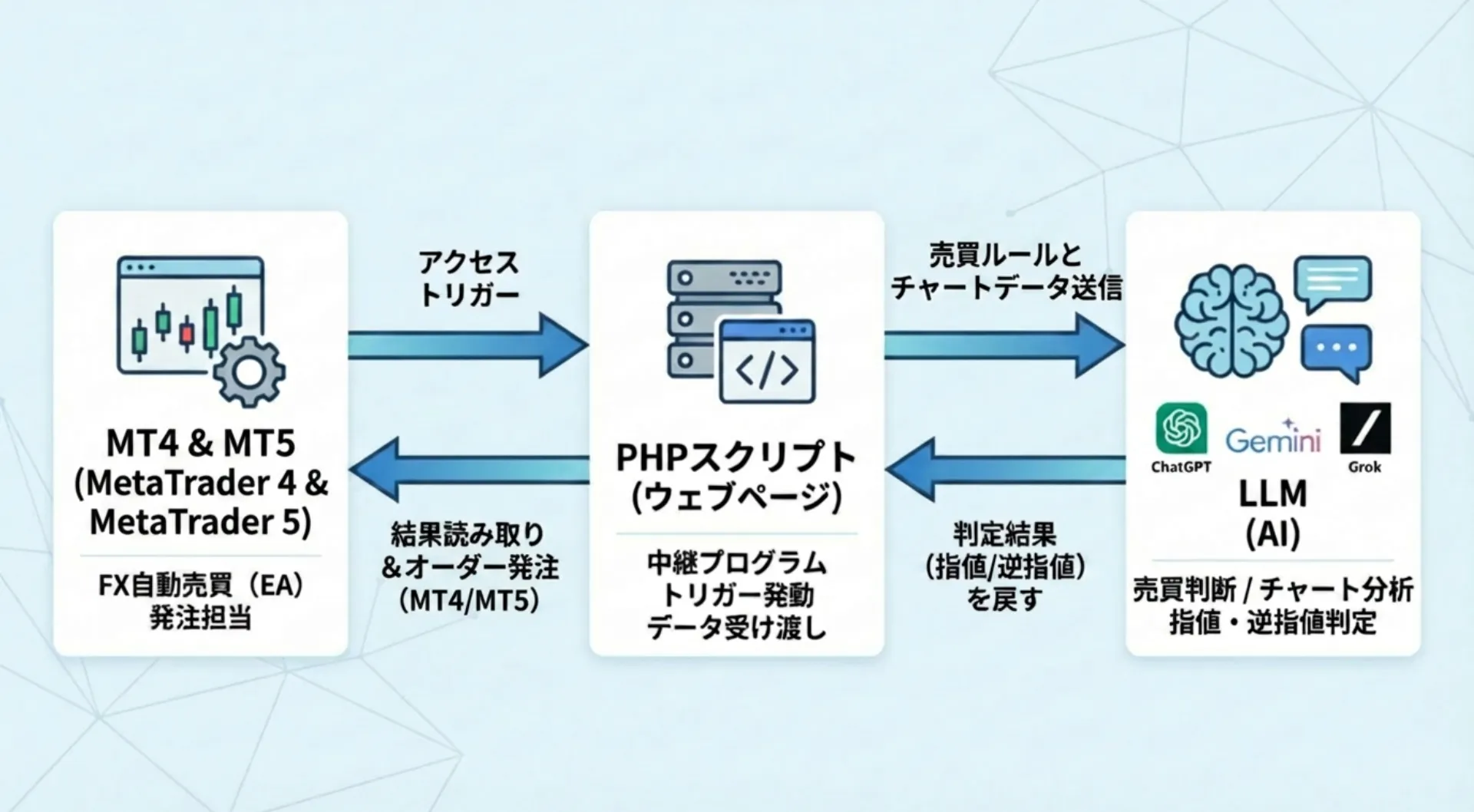
It links MT4/MT5 with PHP and AI, and trades by having the AI analyze 100 OHLC data points from the chart.
OHLC refers to the four values: Open, High, Low, and Close.
Rather than entering solely by fixed logic like a typical EA,the AI analyzes chart conditions to determine resistance lines, round-number levels, breakpoints, etc.which is a major feature.
■ Features of the EA
・Supports MT4 and MT5
・AI determines resistance lines, round-number levels, and breakpoints
・Supports both trend-following and counter-trend logic
・Can send 100 candlestick data points to the AI (configurable in settings)
・Supports from 1-minute to daily charts
・Orders can be placed as limit orders and stop orders
・Designed to easily follow rapid moves due to economic indicators
・AI can determine take profit and stop loss
・Can switch to manual settings (e.g., take profit at 30 pips, stop loss at 20 pips)
・Prompts can be compiled with detailed buy/sell rules and sent to the AI
・Specific trading methods can be reflected in the AI
How this tool works
AI Breakout Line retrieves chart data from MT4/ MT5 and sends it to the AI via PHP.
The AI analyzes the incoming OHLC data and the pre-set buy/sell rules to assess the current market condition.
Based on this,
where to place the breakout line
which price zone to use as a reaction point
how to set take profit and stop loss
and other judgments are made and reflected in trading.
In other words, this is not just automatic trading;a human provides the rules, and the AI executes trades based on those rules.
Switching between trend-following and counter-trend modes is possible
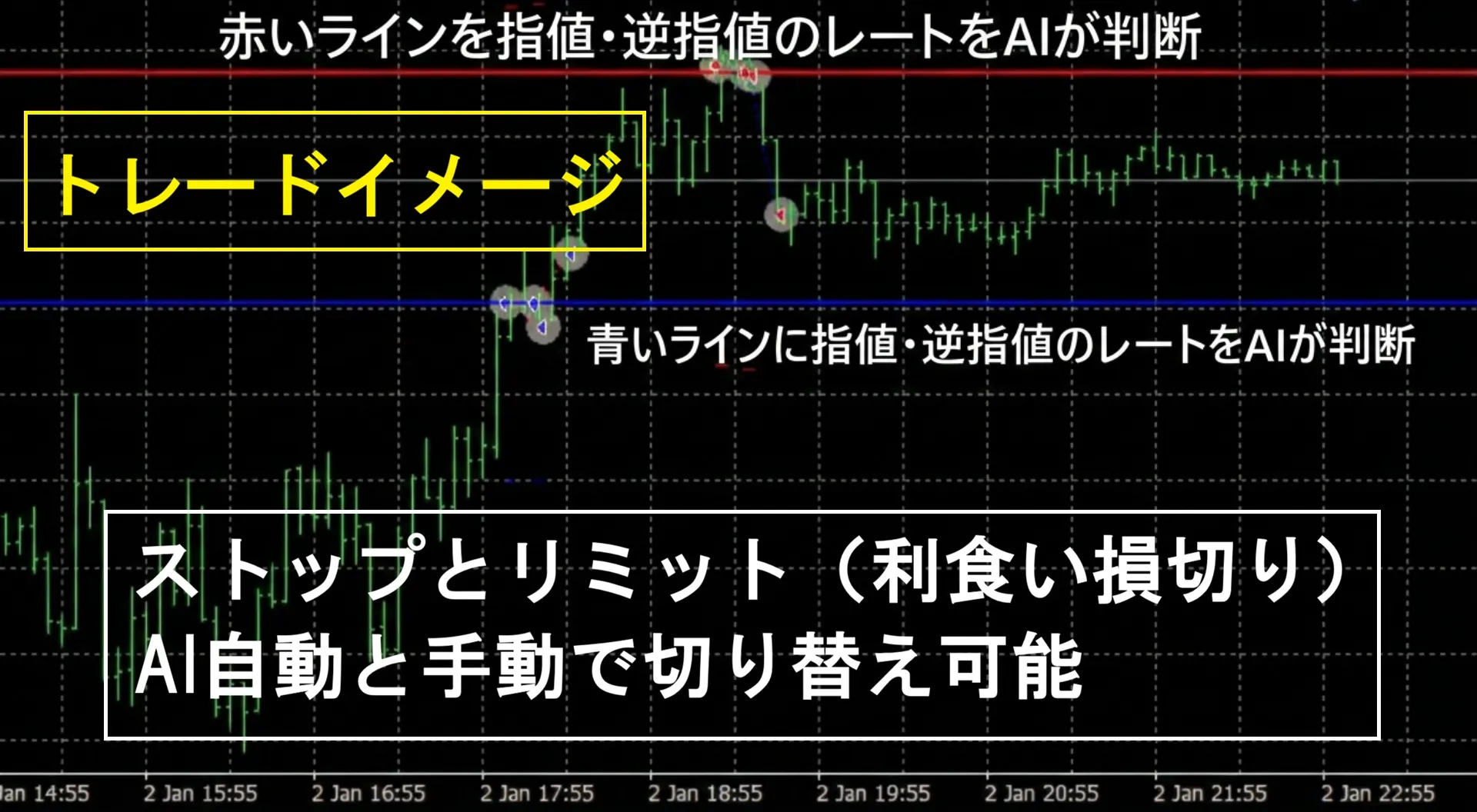
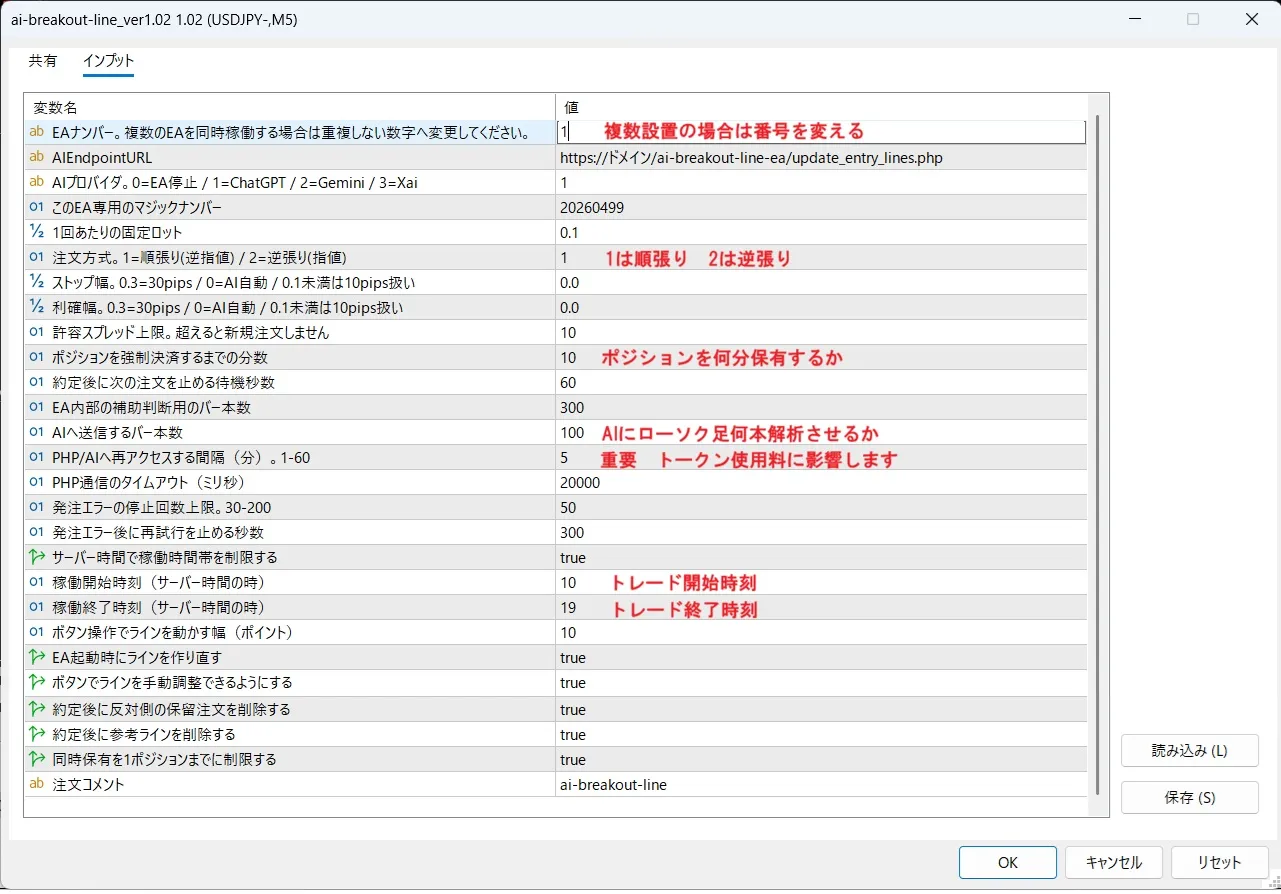
AI Breakout Line allows you to switch between trend-following mode and counter-trend mode in the Properties settings.In trend-following mode, when the price breaks above the current level, it goes long, and when it breaks below, it goes short, via a
stop order.
In other words, it follows the breakout direction.
In counter-trend mode, when the price reaches lines above the current price, it will go short, and when it reaches lines below, it will go long, via alimit order.
This is a counter-trend logic aiming for rebounds.
Therefore, depending on market conditions and your trading policy,you can switch between breakout and rebound strategies, which is the strength of this tool.
Supports from 1-minute to daily charts
This toolsupports from 1-minute to daily charts.
You can also use short-term charts to target micro-breakouts,
or use 4-hour or daily charts to emphasize major trends.
The number of candlesticks sent to the AI can be adjusted,
so you can have it decide mostly on the near term for quick trades.
AI can determine take profit and stop loss
AI Breakout Line not only handles entry but alsoallows AI to decide take profit and stop loss.
Depending on market conditions, you can have the AI determine where to take profits and where to cut losses.
If you prefer fixed values,you can switch to manual settings.
For example,
・Take profit 30 pips
・Stop loss 20 pips
, and operate with traditional fixed settings.
We accommodate both those who want AI flexibility and those who want traditional take profit/stop loss trading.
Prompts allow detailed buy/sell rule specification
By adjusting the prompts sent to the AI, this tool enablesquite detailed trading rules.
For example,
・Want to have the AI decide mainly on buying on a dip
・Only aim for the initial move after a breakout
・Value rebounds near round-number levels
・Want to skip trades when volatility is high
can be described specifically.
Furthermore, by organizing your own research methods or trading logic into text and sending it to the AI,you can reflect your own rules in operation.
The ability to convey nuances in text that are hard to express with fixed logic is a unique appeal of this tool.
What you need before purchasing
To use this tool, the following preparations are required.
・MT4 or MT5
・Rental server (PHP-capable environment)
・AI API key
・Windows VPS if you need 24/7 operation
Where to obtain the API keys is as follows.
Gemini
Please issue the API key with Google AI Studio.
ChatGPT
Log in to the OpenAI Platform and issue an API key.
Grok
Issue the API key on the xAI service page.
Using these APIs is generally paid.
Fees vary depending on the model used, the number of calls, and the data sent.
The AI models default to cost-effective options as follows.
Gemini「gemini-2.5-flash-lite」ChatGPT「gpt-5.4-nano」xAI「grok-4-1-fast-reasoning」
Design to reduce API costs
When using AI, obviously API fees are a concern.API fees.
In this tool, AI access occurs at intervals set in the properties.
For example, if you access the AI every minute,API feescould amount to several thousand yen to tens of thousands of yen per month.
- If once per hour, up to 24 times per day (a few dollars per month?)
- If once every 5 minutes, up to 288 times per day (over $10 per month?)
Thus, by reducing the frequency of AI judgments, you can adjust operating costs.
An approximate guide for expected API usage is
about $0.10–$2 per day per AI. Running one AI for $1 per day translates to about $20 per month (about 3,000 yen) if operated 20 days in a month.
Costs vary depending on the AI model used, call frequency, and data transmitted, but the design makes it easy to adjust to avoid unnecessary costs.
By default, 100 candlesticks are sent to the AI, but there may be an upper limit to how many can be sent.
Who this tool is suited for
AI Breakout Line is suitable for people like the following.
・Looking for a tool with a different concept from typical technical EAs
・Willing to try AI-based trading logic
・Want to adapt breakout and counter-trend strategies to market conditions
・Interested in linking MT4/MT5 with external servers
・Want to convey your own trading rules to AI in text and have them reflected
On the other hand,
"I want simple automated trading on MT4/MT5"
"Setting up servers and API keys is troublesome"
is not suitable for.
You can monitor the forward results of this AI trading in real time.
■ Real trading on Gogojan
https://real-trade.tech/accounts/82850
Please check before purchasing
Regarding the sale of this trading tool,we do not perform any investment advice.
Also, we do not provide technical support for server setup or API key acquisition methods.
For bug reports or issues, please log in to Gogojan's management page and contact the developer Masayan.
[Disclaimer]
・The data, displays, judgments, and trading results contained in this script are not guaranteed to be accurate, complete, useful, or profitable.
・The developer Masayan is not responsible for any losses, disadvantages, or troubles arising from the use of this script.
・Please use this script, adjust settings, modify, verify, and operate at your own judgment and responsibility.
・The copyright of this script belongs to Masayan. For personal use, copying and modification are allowed. However, unauthorized redistribution, reproduction, sale, transfer, or publication is prohibited.
Copy the MT4/MT5 files, save them to the Experts folder of each MT4/MT5, and then compile.
Save the PHP files to your computer first, then upload to the rental server.