

"AI Breakout Line" An EA trading system where AI analyzes the chart, detects breakout points, and automatically enters trades.
I will publicly release the source code of "AI Breakout Line" for a fee.

Please try the free version first
If you are considering purchasing this tool,be sure to verify its operation with the free version first.
AI Breakout Line is not the type that can be used immediately just by placing it into MT4 or MT5 like a typical EA.
You need to install a PHP program on a rented server, and also issue an API key to communicate with the AI.
Therefore,please purchase the paid version only after you have actually completed installation, connection, and operation verification with the free version.
Download the free demo version here
https://www.gogojungle.co.jp/finance/navi/articles/114420
What is AI Breakout Line
AI Breakout Line isan AI trading system that analyzes charts and makes trading decisions based on set trading rules.
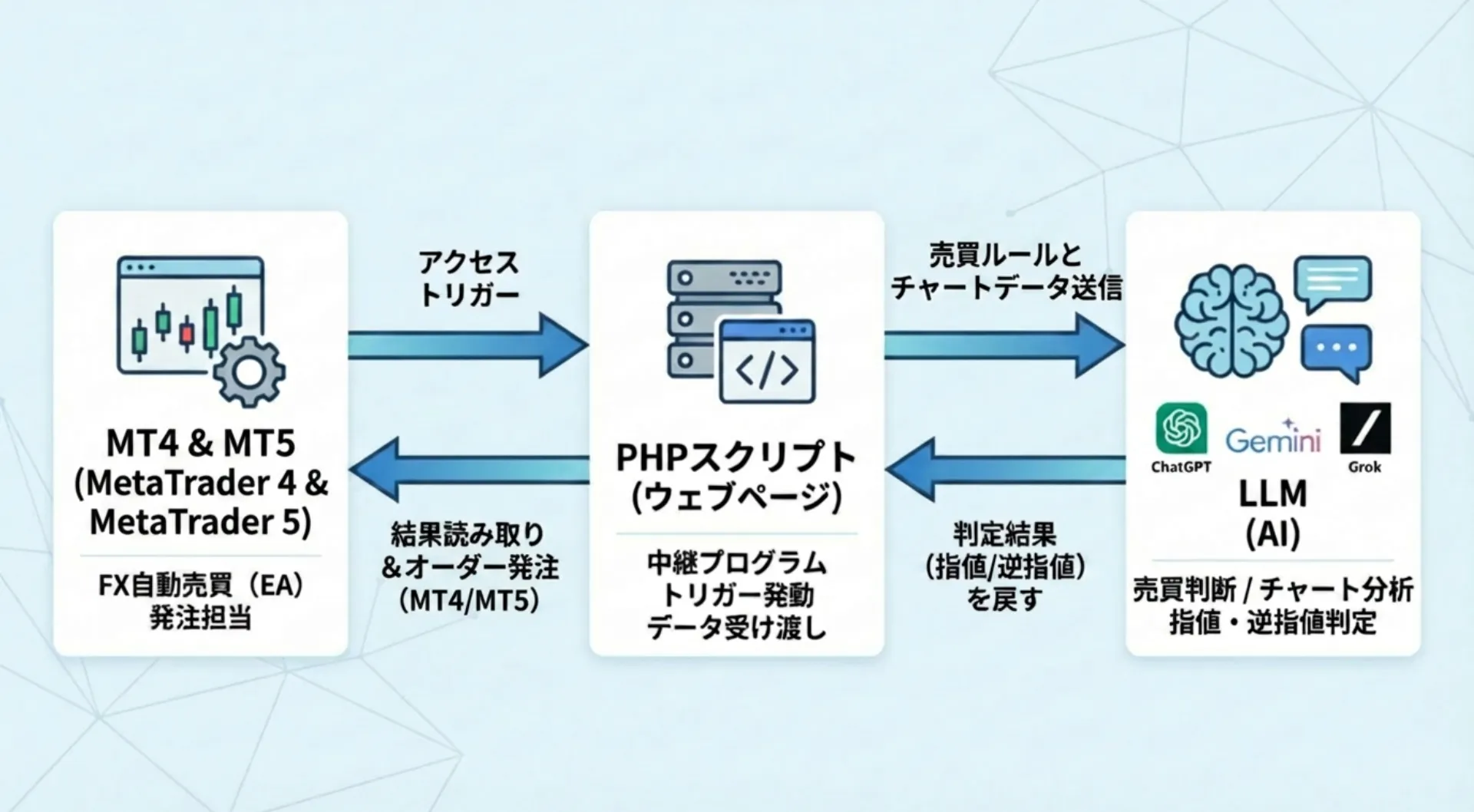
It links MT4/MT5 with PHP and AI, and trades by having the AI analyze 100 OHLC data bars from the chart.
OHLC stands for Open, High, Low, Close—the four price points that describe a bar.
Rather than simply entering trades with fixed logic like a typical EA,the AI analyzes the chart situation and determines resistance lines, round-number levels, breakpoints, etc., which is a major feature.
■ Features of the EA
・Supports MT4 and MT5
・AI determines market resistance lines, round numbers, and breakpoints
・Supports both trend-following and counter-trend logic
・Can send 100 candlestick data bars to AI (configurable in properties)
・Supports from 1-minute to daily charts
・Orders can be placed as limit or stop orders
・Designed to easily follow rapid moves from economic indicators
・AI can determine take profit and stop loss
・Can switch to manual settings (e.g., take profit at 30 pips, stop loss at 20 pips)
・Prompts can summarize detailed trading rules and send them to the AI
・AI can reflect specific trading methods
How this tool works
AI Breakout Line fetches chart data from MT4/MT5 on the client side, and sends it to AI via PHP.
The AI analyzes the incoming OHLC data and the pre-set trading rules to determine the current market situation.
Then it
decides at what price range to place breakout lines
which price levels to use as reversal points
how to set take profit and stop loss
and reflects these in trading decisions.
In other words, it is not just an automatic trader,but a system where a human provides the rules and the AI executes trades based on those rules.
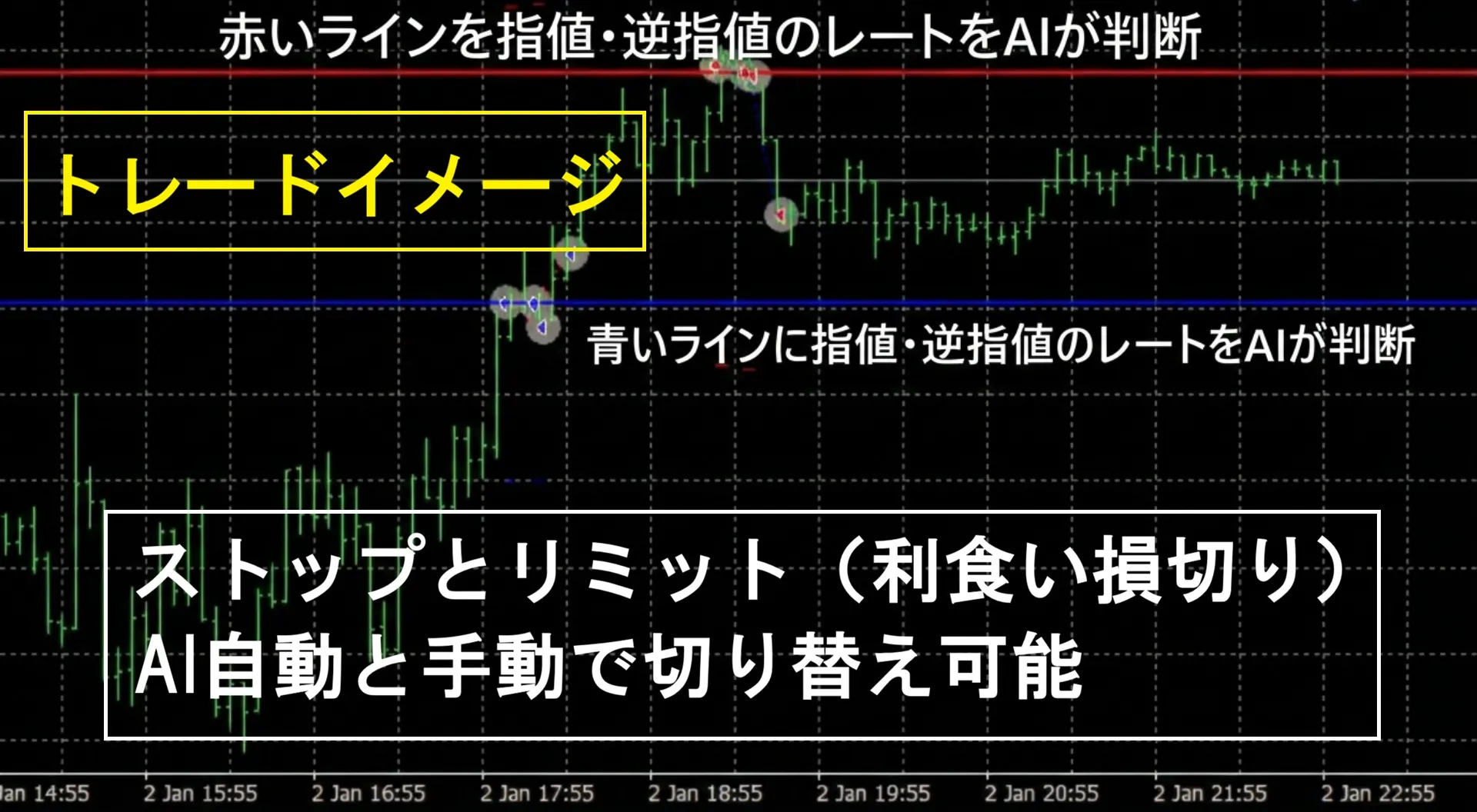
Switching between breakout and reversal modes is possible
AI Breakout Lineallows switching between trend-following mode and reversal mode via property settings.
In trend-following mode, when the price breaks above the upper line, it places a long, and when it breaks below the lower line, it places a shortstop order.
In other words, it follows the direction of the breakout.
In reversal mode, when the current price reaches the upper line, it places a short, and when it reaches the lower line, it places a longlimit order.
This is a reversal-aiming logic.
Thus, depending on market conditions and your trading philosophy,you can switch between breakout and reversal targets.
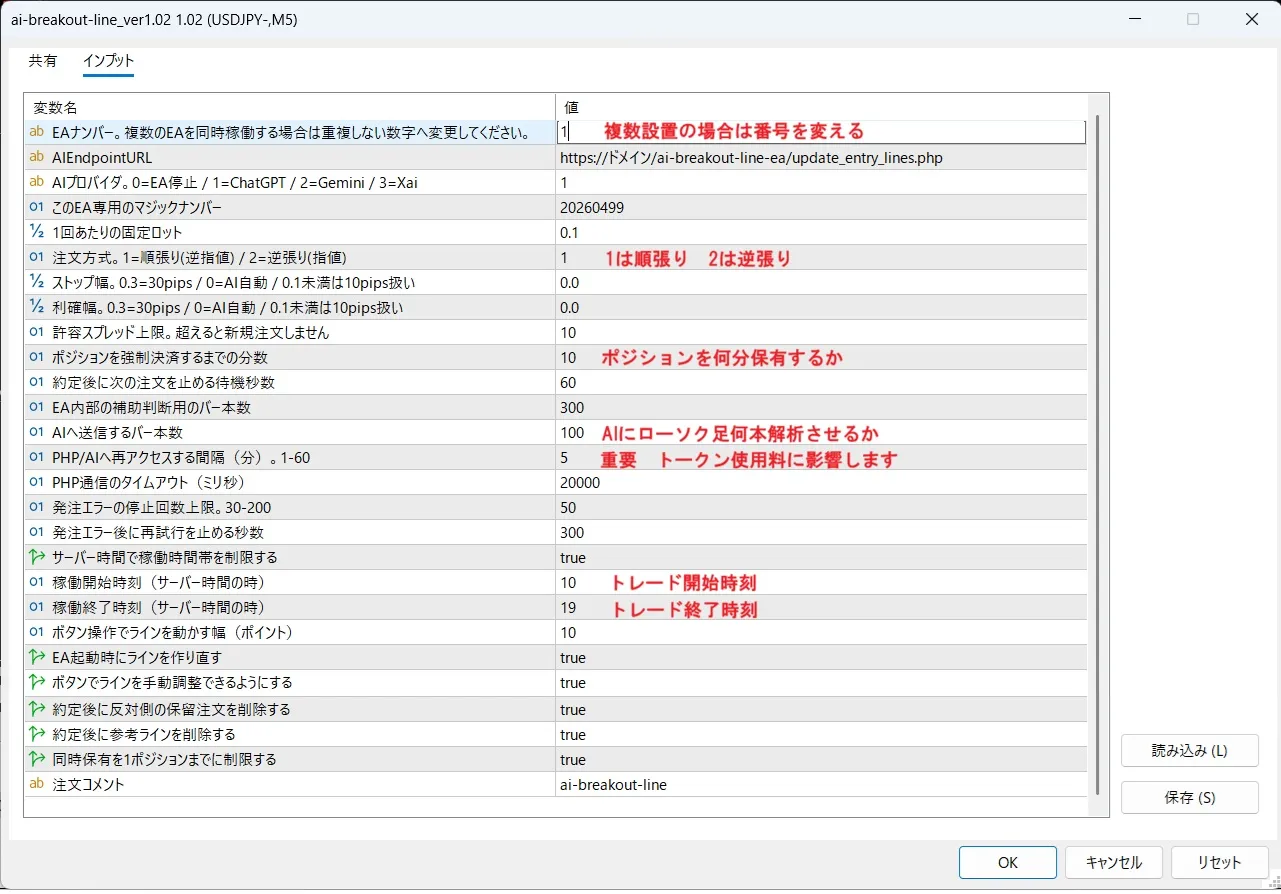
Supports from 1 minute to daily charts
This toolsupports from 1-minute charts to daily charts.
You can use it to target breakouts on short-term charts,
or use 4-hour or daily charts to emphasize the larger trend.
The number of candlesticks sent to AI can be adjusted,
so you can have the AI decide based on recent data for short-term trading.
AI can also determine take profit and stop loss
AI Breakout Line not only handles entry but alsoallows AI to determine take profit and stop loss.
Depending on market conditions, you can let AI decide where to take profits and where to cut losses.
On the other hand, if you prefer fixed values,you can switch to manual settings.
For example,
・Take profit 30 pips
・Stop loss 20 pips
is how you can operate with traditional fixed settings.
Whether you want to leverage AI flexibility or trade with traditional take profit/stop loss, this tool supports both.
Prompts can specify detailed trading rules
By adjusting the prompts sent to AI, this tool enablesquite detailed trading rules.
For example,
・Want to base decisions on buying on dips
・Only want to target the initial move after a breakout
・Want to emphasize reversals near key numbers
・Want to avoid trading when volatility is high
you can specify these conditions precisely.
Furthermore, by organizing your own researched methods or trading logic in text and sending it to AI,you can implement your own rules.
The ability to convey nuanced ideas in text to AI, which is hard to express with fixed logic, is a unique appeal of this tool.
What you need before purchasing
To use this tool, the following preparations are required.
・MT4 or MT5
・Rental server (PHP-capable environment)
・AI API key
・Windows VPS if you need it running 24/7
The API key sources are as follows.
Gemini
Please issue an API key from Google AI Studio.
ChatGPT
Log in to the OpenAI Platform and issue an API key.
Grok
Please issue an API key from the xAI service page.
Use of these APIs is basically paid.
Fees vary depending on the model used, the number of calls, and the amount of data sent.
The AI models use by default are cost-conscious and include the following:
Gemini "gemini-2.5-flash-lite" ChatGPT "gpt-5.4-nano" xAI "grok-4-1-fast-reasoning"
Design to reduce API costs
When using AI, what people worry about isAPI costs.
In this tool, AI access occurs at intervals set in the properties.
For example, if you access AI every minute,API costscould amount to several thousand yen to tens of thousands of yen per month.
- If you access once per hour, up to 24 times per day (a few dollars per month?)
- If you access once every 5 minutes, up to 288 times per day (over $10 per month?)
Thus, you can control operation costs by limiting AI judgment frequency.
A rough estimate of expected API usage is
about $0.10–$2 per day per AI. If it’s $1 per day, running 20 days a month would be about $20 per month (about 3,000 yen).
Costs vary depending on the AI model used, call frequency, and data volume, but the design makes it easy to avoid unnecessary cost growth.
By default, 100 candlesticks are sent to AI, but there may be a practical upper limit.
Who this tool is suited for
AI Breakout Line is suitable for people like:
・Seeking a tool with a non-traditional approach from ordinary technical EAs
・Want to try AI-based trading logic
・Want to switch between breakout and reversal based on market conditions
・Interested in linking MT4/MT5 with an external server
・Want to convey your own trading rules to AI in text and have them reflected
On the other hand,
「I want to automatically trade easily on MT4/MT5」
「Server setup and API keys are bothersome」
such users may find it unsuitable.
You can view real-time forward results of this AI trading.
■ Real trading on Gogojan in operation
https://real-trade.tech/accounts/82850
Please be sure to confirm before purchasing
Regarding the sale of this trading tool,we do not engage in investment advice of any kind.
Also, we do not provide technical support for server settings or API key procurement.
For bug reports or issues, please log in to Gogojan’s management page and contact the developer Masayan.
【Disclaimer】
・The data, display contents, judgment results, and trading results contained in this script are not guaranteed to be accurate, complete, useful, or profitable.
・We, the developer Masayan, are not responsible for any losses, disadvantages, or troubles arising from using this script.
・Use, configuration changes, modification, verification, and operation of this script are at the user’s own risk and judgment.
・The copyright of this script belongs to Masayan. For personal use, copying and modification are allowed. However, redistribution, republication, sale, transfer, or public release without permission is prohibited.
Copy the MT4/MT5 files to each MT4/MT5's Experts folder and then compile them.
Save the PHP files to your computer first, then upload them to the rental server.