

A simple-designed indicator OMEGA that only waits for the signals defined by MT4 (with video)

① Simple design that waits for a predetermined signal
② Visually simple directional view of the market. Suitable for beginners to advanced
③ Intuitive design that only displays up and down, accommodating a wide range of traders
Currently, the market signal status is as usual.
(New videos)


① High-win-rate trade signal indicator
Trading history10+ years of experience, organized and verified experiences from numerous oscillator-based methods, refined over about5 years into this indicator.
Displaying multiple indicators simultaneously and judging the match condition by eye can lead to missed opportunities and visual overload that increases judgment errors.
This tool internally combines multiple indicators,and only displays the points where conditions are met with simple arrows (⬆︎⬇︎).Additionally, to avoid missing opportunities,trade signals also support alert notifications to smartphones.It looks very simple, but internally the program handles multiple conditions with precision,designed to suppress unnecessary signals.Regarding actual behavior,we have published verification videos with long-term charts recorded uninterruptedly,so you can verify it in a form different from materials that only show some favorable conditions.⬇︎With a simple chart structure, reduce decision hesitationand support stable trading② How to useA simple trading method: enter on the next bar when an arrow appears✅ STEP01:Set the chart time frame (5-minute recommended)✅ STEP02:An alert will sound at the entry point (smartphone notification available)✅ STEP03:Arrows (⬆︎⬇︎) appear on the chart simultaneously with the alert✅ STEP04:Enter after the bar closes and the arrow is confirmed③ Win-rate displayThe win-rate display in the upper left (judgment result) is based on the number of candlesticks in the specified range (default 3000 bars).This corresponds to a win-rate over about 10 days when using 5-minute bars; since weekends are closed for forex, it represents the five trading days from Monday to Friday, i.e., the past two weeks' win-rate.The long-term goal is to minimize losing judgments, and by default the best oscillator settings are displayed. As you can see, the display is easy to understand with no confusing interpretations!④ Specifications✅ Arrow appears ➡︎ enter on the next bar✅ Signal reveal filter specialized for contrarian trading✅ No repaint✅ Win-rate judgment calculated by the number of candlesticks within the specified range✅ Each signal settles within two entries✅ Recommended time frame: 5 minutes(Other timeframes also displayable)✅ Alert sound notification when a signal occurs✅ Push notifications to smartphones (iPhone / Android)⑤ Product contents✅ OMEGA Sign Tool Indicator✅ Bid_Line v2 (indicator) to thicken price lines for clarity✅ Template (OMEGA indicator and Bid Line v2 should be inserted from Navigator)✅ Manual (PDF)Trend Line Toolhttps://www.gogojungle.co.jp/tools/indicators/39409MT4 exclusive Trend Line Indicator (introduction video)※ Playback recommended with Google ChromeDrawing video for Trend Line Tool (5 days nonstop recording)※ Playback recommended with Google ChromeContrarian Trading Tool OMEGALink to product detailsAll basic operations and details are explained in video!
and only displays the points where conditions are met with simple arrows (⬆︎⬇︎).
Additionally, to avoid missing opportunities,
trade signals also support alert notifications to smartphones.
It looks very simple, but internally the program handles multiple conditions with precision,designed to suppress unnecessary signals.Regarding actual behavior,we have published verification videos with long-term charts recorded uninterruptedly,so you can verify it in a form different from materials that only show some favorable conditions.⬇︎With a simple chart structure, reduce decision hesitationand support stable trading② How to useA simple trading method: enter on the next bar when an arrow appears✅ STEP01:Set the chart time frame (5-minute recommended)✅ STEP02:An alert will sound at the entry point (smartphone notification available)✅ STEP03:Arrows (⬆︎⬇︎) appear on the chart simultaneously with the alert✅ STEP04:Enter after the bar closes and the arrow is confirmed③ Win-rate displayThe win-rate display in the upper left (judgment result) is based on the number of candlesticks in the specified range (default 3000 bars).This corresponds to a win-rate over about 10 days when using 5-minute bars; since weekends are closed for forex, it represents the five trading days from Monday to Friday, i.e., the past two weeks' win-rate.The long-term goal is to minimize losing judgments, and by default the best oscillator settings are displayed. As you can see, the display is easy to understand with no confusing interpretations!④ Specifications✅ Arrow appears ➡︎ enter on the next bar✅ Signal reveal filter specialized for contrarian trading✅ No repaint✅ Win-rate judgment calculated by the number of candlesticks within the specified range✅ Each signal settles within two entries✅ Recommended time frame: 5 minutes(Other timeframes also displayable)✅ Alert sound notification when a signal occurs✅ Push notifications to smartphones (iPhone / Android)⑤ Product contents✅ OMEGA Sign Tool Indicator✅ Bid_Line v2 (indicator) to thicken price lines for clarity✅ Template (OMEGA indicator and Bid Line v2 should be inserted from Navigator)✅ Manual (PDF)Trend Line Toolhttps://www.gogojungle.co.jp/tools/indicators/39409MT4 exclusive Trend Line Indicator (introduction video)※ Playback recommended with Google ChromeDrawing video for Trend Line Tool (5 days nonstop recording)※ Playback recommended with Google ChromeContrarian Trading Tool OMEGALink to product detailsAll basic operations and details are explained in video!
designed to suppress unnecessary signals.
Regarding actual behavior,
we have published verification videos with long-term charts recorded uninterruptedly,so you can verify it in a form different from materials that only show some favorable conditions.⬇︎With a simple chart structure, reduce decision hesitationand support stable trading② How to useA simple trading method: enter on the next bar when an arrow appears✅ STEP01:Set the chart time frame (5-minute recommended)✅ STEP02:An alert will sound at the entry point (smartphone notification available)✅ STEP03:Arrows (⬆︎⬇︎) appear on the chart simultaneously with the alert✅ STEP04:Enter after the bar closes and the arrow is confirmed③ Win-rate displayThe win-rate display in the upper left (judgment result) is based on the number of candlesticks in the specified range (default 3000 bars).This corresponds to a win-rate over about 10 days when using 5-minute bars; since weekends are closed for forex, it represents the five trading days from Monday to Friday, i.e., the past two weeks' win-rate.The long-term goal is to minimize losing judgments, and by default the best oscillator settings are displayed. As you can see, the display is easy to understand with no confusing interpretations!④ Specifications✅ Arrow appears ➡︎ enter on the next bar✅ Signal reveal filter specialized for contrarian trading✅ No repaint✅ Win-rate judgment calculated by the number of candlesticks within the specified range✅ Each signal settles within two entries✅ Recommended time frame: 5 minutes(Other timeframes also displayable)✅ Alert sound notification when a signal occurs✅ Push notifications to smartphones (iPhone / Android)⑤ Product contents✅ OMEGA Sign Tool Indicator✅ Bid_Line v2 (indicator) to thicken price lines for clarity✅ Template (OMEGA indicator and Bid Line v2 should be inserted from Navigator)✅ Manual (PDF)Trend Line Toolhttps://www.gogojungle.co.jp/tools/indicators/39409MT4 exclusive Trend Line Indicator (introduction video)※ Playback recommended with Google ChromeDrawing video for Trend Line Tool (5 days nonstop recording)※ Playback recommended with Google ChromeContrarian Trading Tool OMEGALink to product detailsAll basic operations and details are explained in video!
so you can verify it in a form different from materials that only show some favorable conditions.
⬇︎
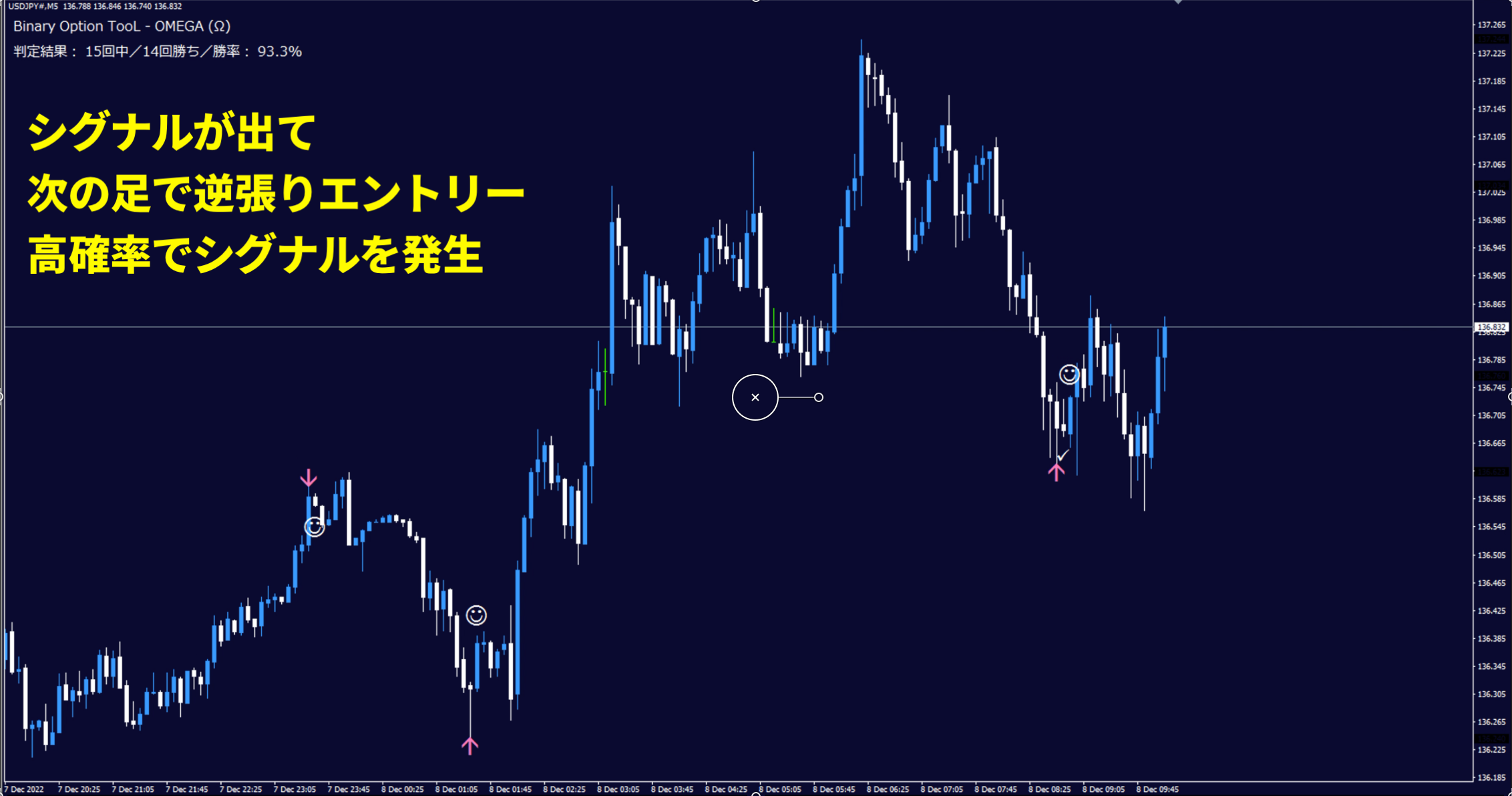
With a simple chart structure, reduce decision hesitation
and support stable trading
② How to use
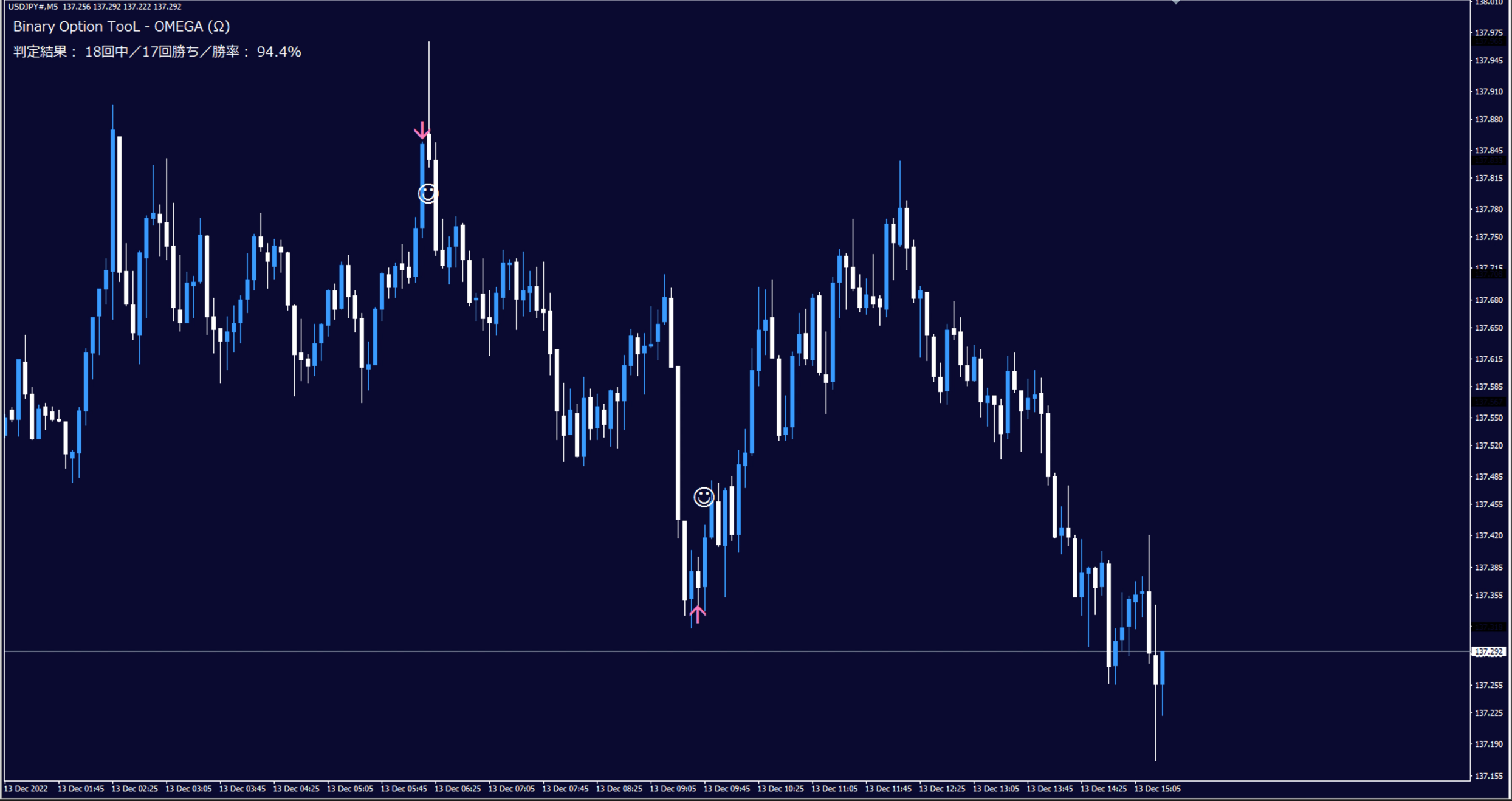
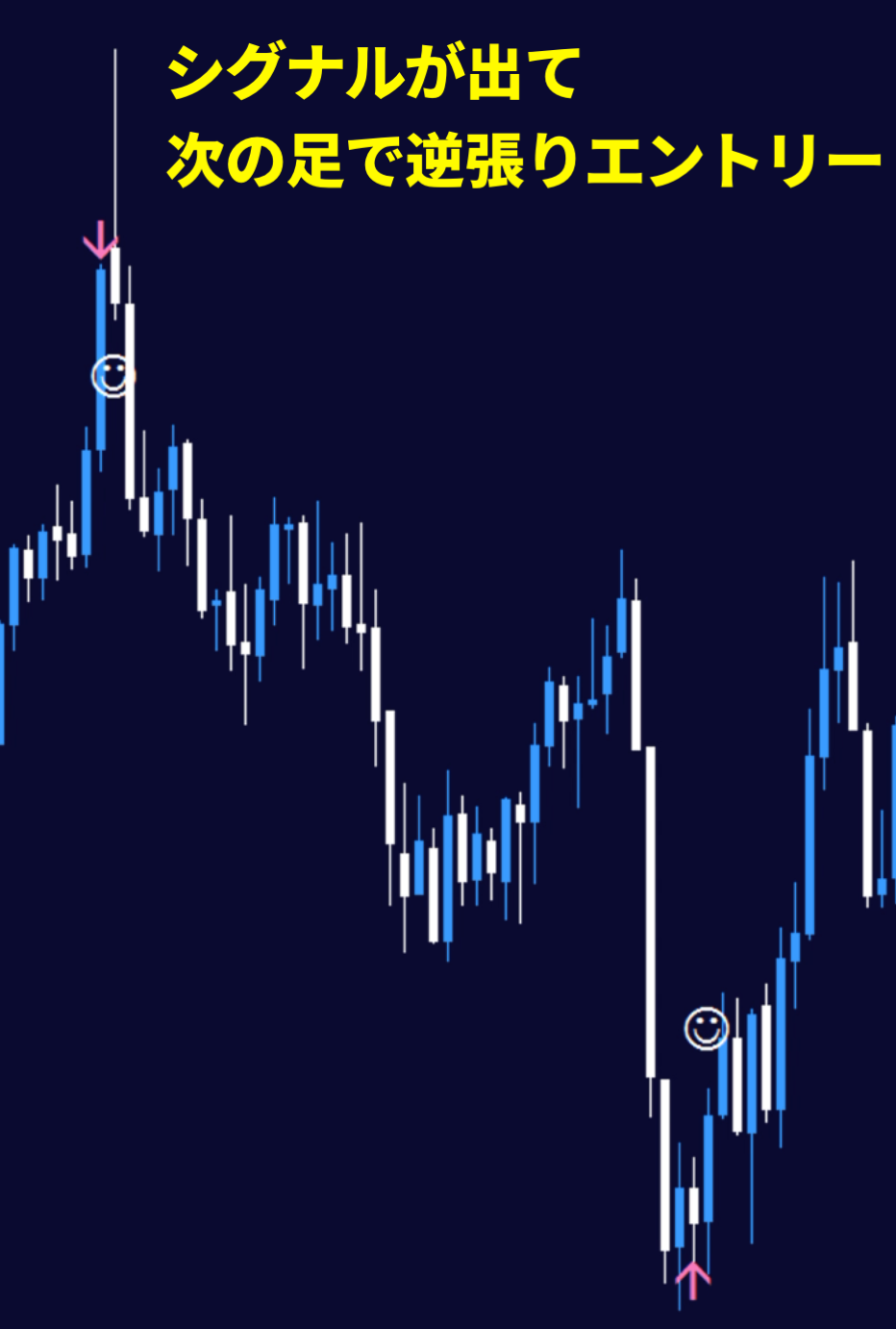
A simple trading method: enter on the next bar when an arrow appears
③ Win-rate display
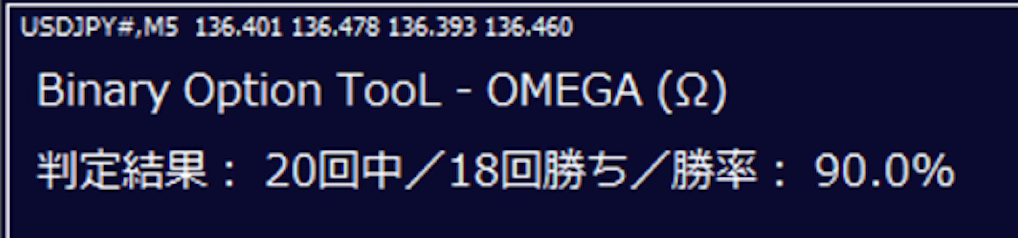
The win-rate display in the upper left (judgment result) is based on the number of candlesticks in the specified range (default 3000 bars).
This corresponds to a win-rate over about 10 days when using 5-minute bars; since weekends are closed for forex, it represents the five trading days from Monday to Friday, i.e., the past two weeks' win-rate.
The long-term goal is to minimize losing judgments, and by default the best oscillator settings are displayed. As you can see, the display is easy to understand with no confusing interpretations!
④ Specifications✅ Arrow appears ➡︎ enter on the next bar
✅ Signal reveal filter specialized for contrarian trading✅ No repaint✅ Win-rate judgment calculated by the number of candlesticks within the specified range
✅ Each signal settles within two entries
✅ Recommended time frame: 5 minutes(Other timeframes also displayable)
✅ Alert sound notification when a signal occurs✅ Push notifications to smartphones (iPhone / Android)
✅ Each signal settles within two entries
✅ Recommended time frame: 5 minutes(Other timeframes also displayable)
✅ Alert sound notification when a signal occurs
⑤ Product contents✅ OMEGA Sign Tool Indicator✅ Bid_Line v2 (indicator) to thicken price lines for clarity✅ Template (OMEGA indicator and Bid Line v2 should be inserted from Navigator)
✅ Manual (PDF)
MT4 exclusive Trend Line Indicator (introduction video)※ Playback recommended with Google Chrome
Drawing video for Trend Line Tool (5 days nonstop recording)※ Playback recommended with Google Chrome
Contrarian Trading Tool OMEGA