Challenge automated trading with MT4!! Let's start! EA Life | Episode 12: How to backtest an EA① [Masao Kakizawa]

Masanao Kakiwara Profile

Kakizawa Masanobu. Since 2009 he has been developing automated FX trading systems, launching many systems such as EasySniper and MultiAgent, and providing them to brokers and users. At Invast Securities’ automated trading service “Systrade24,” the provided strategy MultiAgent achieved an overwhelming performance and high evaluation in the 2016 annual awards. Also, at Himawari Securities’ automated trading service “Ecoture,” the provided strategy “Hikakeme Venus” maintained the top number of users for more than a year from 2013 to 2014, with over 700 users. Currently, he is offering Dream Agent FX, an evolution of MultiAgent.
In this series, we will spotlight automated FX trading systems, focusing on Expert Advisors (EA) that run on MetaTrader 4 (MT4), and will have professional trader Masanobu Kakizawa guide you through the knowledge and know-how needed to operate them. This is recommended not only for those considering operating EAs but also for those already using them.
*This article is a reprint and revised edition of an article from FX攻略.com May 2019 issue. Please note that the market information written here may differ from current market conditions.
Backtesting Method
Hello everyone. In the last two installments we discussed “EA evaluation and selection methods.” To evaluate those EAs, backtesting is an important metric, and in this and subsequent installments we will explain it. For the first session of “How to backtest an EA,” we will look at “How to operate a backtesting tool.”
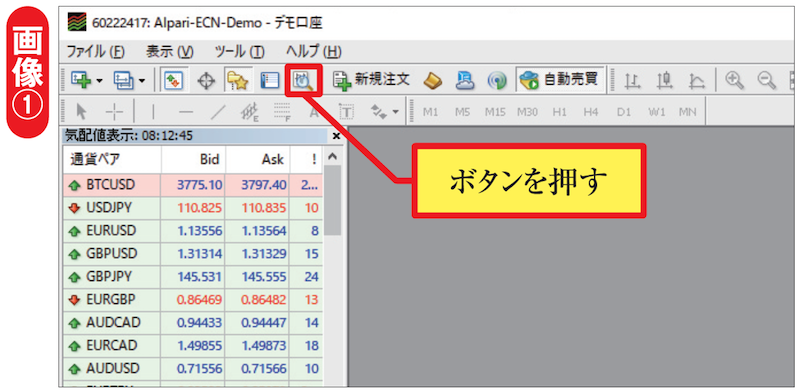
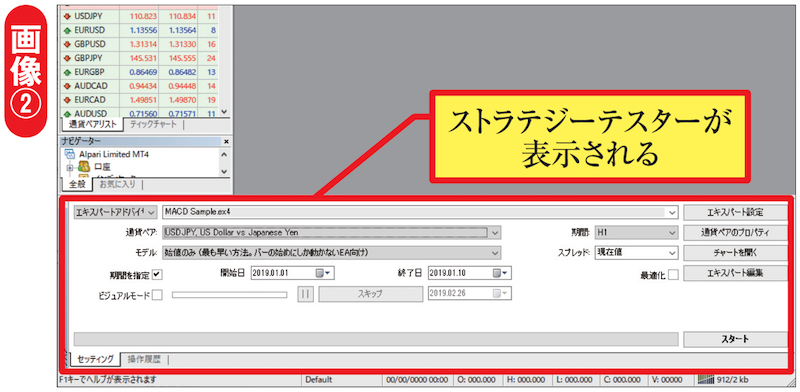
Backtesting tools are standard features in MT4 and are called the Strategy Tester on MT4. Normally, the Strategy Tester is not running when MT4 is launched. Please press the magnifying glass button at the top of MT4, as shown in image ①. This will display the Strategy Tester at the bottom of MT4, making it usable (image ②).