

Reduce discretion and increase accuracy. Three types of signal tools and resistance indicator that only wait (with video)

① Simple design that waits for a predetermined sign
② Visually simple visualization of market direction. Suitable for beginners to advanced users
③ Intuitive design that only shows up or down. Caters to a wide range of traders
Currently, market signals are as usual.
(New videos)


① High-win-rate buy/sell signal indicator
Trading experience over 10 years, we have organized and tested the know-how of various oscillator methods, and have refined it over about 5 years into this indicator.
Displaying multiple indicators simultaneously and judging matching conditions by eye is a method that can lead to missing opportunities and visual fatigue can cause judgment errors.
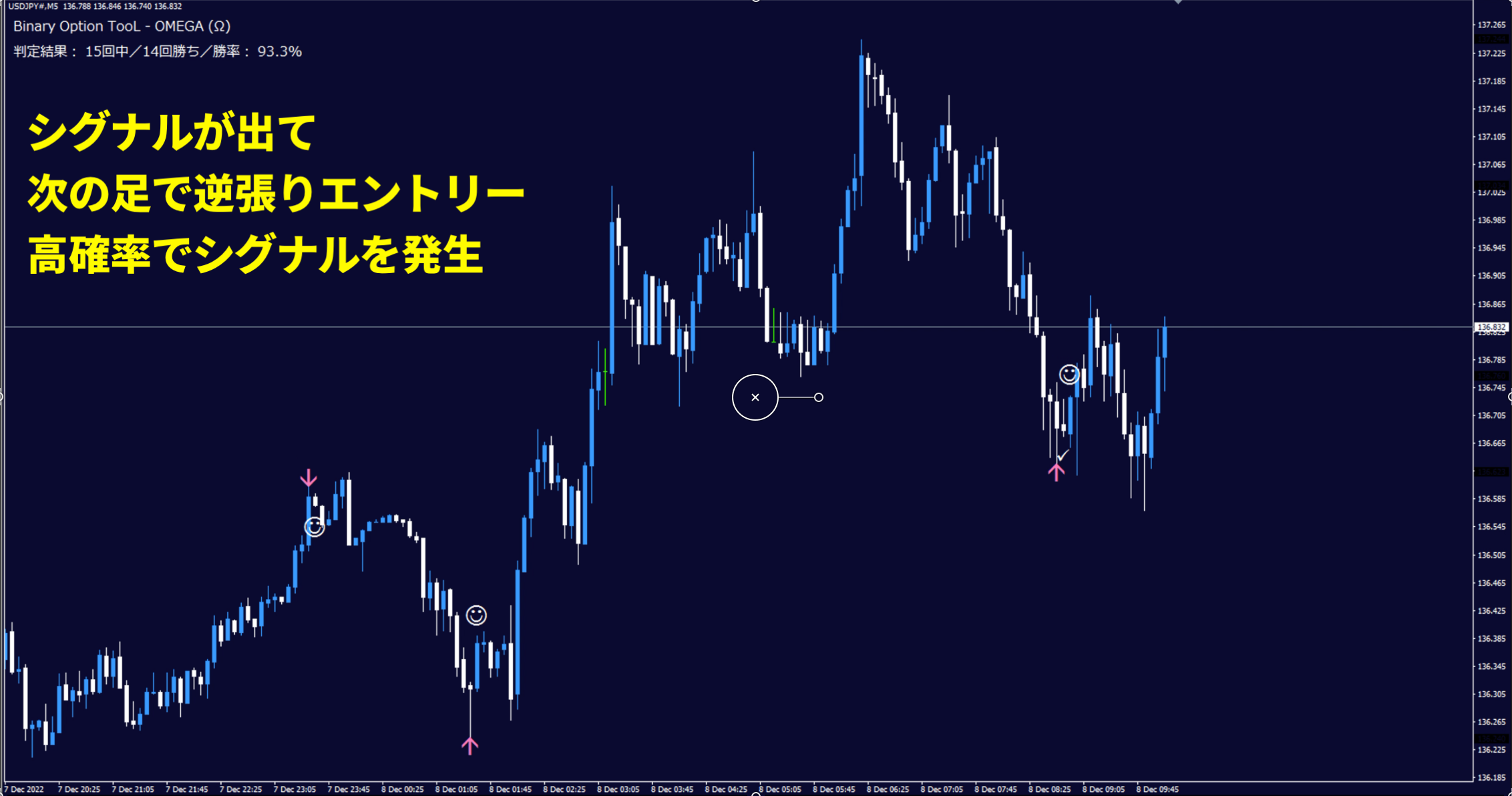
This tool internally combines multiple indicators,and only shows points where conditions are aligned with simple arrows (⬆︎⬇︎).Also, to avoid missing opportunities,buy/sell signals are supported with smartphone alerts.The appearance is very simple, butinternally the program processes multiple conditions with precision,and it is designed to suppress unnecessary signals.Regarding actual behavior,we publish validation videos recorded over a long period without cuts,so you can confirm it in a form that is not just a sample of favorable conditions.⬇︎With a simple chart setup, reduce hesitation in judgmentsSupport for stable trading② How to useSimply enter when the arrow appears; a straightforward trading method✅ STEP01:Set the chart time frame (5-minute chart recommended)✅ STEP02:An alert sounds at the entry point (phone notification possible)✅ STEP03:Arrow (⬆︎⬇︎) appears on the chart at the same time as the alert✅ STEP04:Enter after the arrow candle closes③ Win-rate displayThe win rate in the top-left is calculated based on the number of specified candles (default 3000 candles).This corresponds to a 10-day win rate on a 5-minute chart, with 288 candles per day; weekends are closed for forex, so it is the win rate for the past five days (Mon–Fri) over the past two weeks.The default display is designed to optimize oscillator settings to minimize losses over the long term. As you can see, it is a clear display without complicated interpretation!④ Specifications✅ Arrow appears ➜ enter at the next candle✅ A signal appearance filter specialized for contrarian signals✅ No repaint✅ Win-rate judged by the number of candles within the specified range✅ One signal leads to two possible entries and resolves✅ Recommended time frame: 5 minutes(Other time frames can also be displayed)✅ Alerts sound when a signal occurs✅ Push notifications to smartphones (iPhone / Android)⑤ What is included✅ OMEGA Sign Tool Indicator✅ Bid_Line v2 (Indicator) to make price lines thicker and clearer✅ Templates (OMEGA indicator and Bid Line v2 should be inserted from Navigator)✅ Manual (PDF)Trend Line Toolhttps://www.gogojungle.co.jp/tools/indicators/39409MT4-exclusive Trend Line Indicator (Introduction video) Note: Google Chrome recommended for playbackDrawing video of the Trend Line Tool (5 days non-stop recording) Note: Google Chrome recommended for playbackContrarian Tool OMEGALink to product detailsAll basic operations and details are explained in videos!
and only shows points where conditions are aligned with simple arrows (⬆︎⬇︎).
Also, to avoid missing opportunities,
buy/sell signals are supported with smartphone alerts.
The appearance is very simple, but
internally the program processes multiple conditions with precision,and it is designed to suppress unnecessary signals.Regarding actual behavior,we publish validation videos recorded over a long period without cuts,so you can confirm it in a form that is not just a sample of favorable conditions.⬇︎With a simple chart setup, reduce hesitation in judgmentsSupport for stable trading② How to useSimply enter when the arrow appears; a straightforward trading method✅ STEP01:Set the chart time frame (5-minute chart recommended)✅ STEP02:An alert sounds at the entry point (phone notification possible)✅ STEP03:Arrow (⬆︎⬇︎) appears on the chart at the same time as the alert✅ STEP04:Enter after the arrow candle closes③ Win-rate displayThe win rate in the top-left is calculated based on the number of specified candles (default 3000 candles).This corresponds to a 10-day win rate on a 5-minute chart, with 288 candles per day; weekends are closed for forex, so it is the win rate for the past five days (Mon–Fri) over the past two weeks.The default display is designed to optimize oscillator settings to minimize losses over the long term. As you can see, it is a clear display without complicated interpretation!④ Specifications✅ Arrow appears ➜ enter at the next candle✅ A signal appearance filter specialized for contrarian signals✅ No repaint✅ Win-rate judged by the number of candles within the specified range✅ One signal leads to two possible entries and resolves✅ Recommended time frame: 5 minutes(Other time frames can also be displayed)✅ Alerts sound when a signal occurs✅ Push notifications to smartphones (iPhone / Android)⑤ What is included✅ OMEGA Sign Tool Indicator✅ Bid_Line v2 (Indicator) to make price lines thicker and clearer✅ Templates (OMEGA indicator and Bid Line v2 should be inserted from Navigator)✅ Manual (PDF)Trend Line Toolhttps://www.gogojungle.co.jp/tools/indicators/39409MT4-exclusive Trend Line Indicator (Introduction video) Note: Google Chrome recommended for playbackDrawing video of the Trend Line Tool (5 days non-stop recording) Note: Google Chrome recommended for playbackContrarian Tool OMEGALink to product detailsAll basic operations and details are explained in videos!
and it is designed to suppress unnecessary signals.
Regarding actual behavior,
we publish validation videos recorded over a long period without cuts,so you can confirm it in a form that is not just a sample of favorable conditions.⬇︎With a simple chart setup, reduce hesitation in judgmentsSupport for stable trading② How to useSimply enter when the arrow appears; a straightforward trading method✅ STEP01:Set the chart time frame (5-minute chart recommended)✅ STEP02:An alert sounds at the entry point (phone notification possible)✅ STEP03:Arrow (⬆︎⬇︎) appears on the chart at the same time as the alert✅ STEP04:Enter after the arrow candle closes③ Win-rate displayThe win rate in the top-left is calculated based on the number of specified candles (default 3000 candles).This corresponds to a 10-day win rate on a 5-minute chart, with 288 candles per day; weekends are closed for forex, so it is the win rate for the past five days (Mon–Fri) over the past two weeks.The default display is designed to optimize oscillator settings to minimize losses over the long term. As you can see, it is a clear display without complicated interpretation!④ Specifications✅ Arrow appears ➜ enter at the next candle✅ A signal appearance filter specialized for contrarian signals✅ No repaint✅ Win-rate judged by the number of candles within the specified range✅ One signal leads to two possible entries and resolves✅ Recommended time frame: 5 minutes(Other time frames can also be displayed)✅ Alerts sound when a signal occurs✅ Push notifications to smartphones (iPhone / Android)⑤ What is included✅ OMEGA Sign Tool Indicator✅ Bid_Line v2 (Indicator) to make price lines thicker and clearer✅ Templates (OMEGA indicator and Bid Line v2 should be inserted from Navigator)✅ Manual (PDF)Trend Line Toolhttps://www.gogojungle.co.jp/tools/indicators/39409MT4-exclusive Trend Line Indicator (Introduction video) Note: Google Chrome recommended for playbackDrawing video of the Trend Line Tool (5 days non-stop recording) Note: Google Chrome recommended for playbackContrarian Tool OMEGALink to product detailsAll basic operations and details are explained in videos!
so you can confirm it in a form that is not just a sample of favorable conditions.
⬇︎
With a simple chart setup, reduce hesitation in judgments
Support for stable trading
② How to use
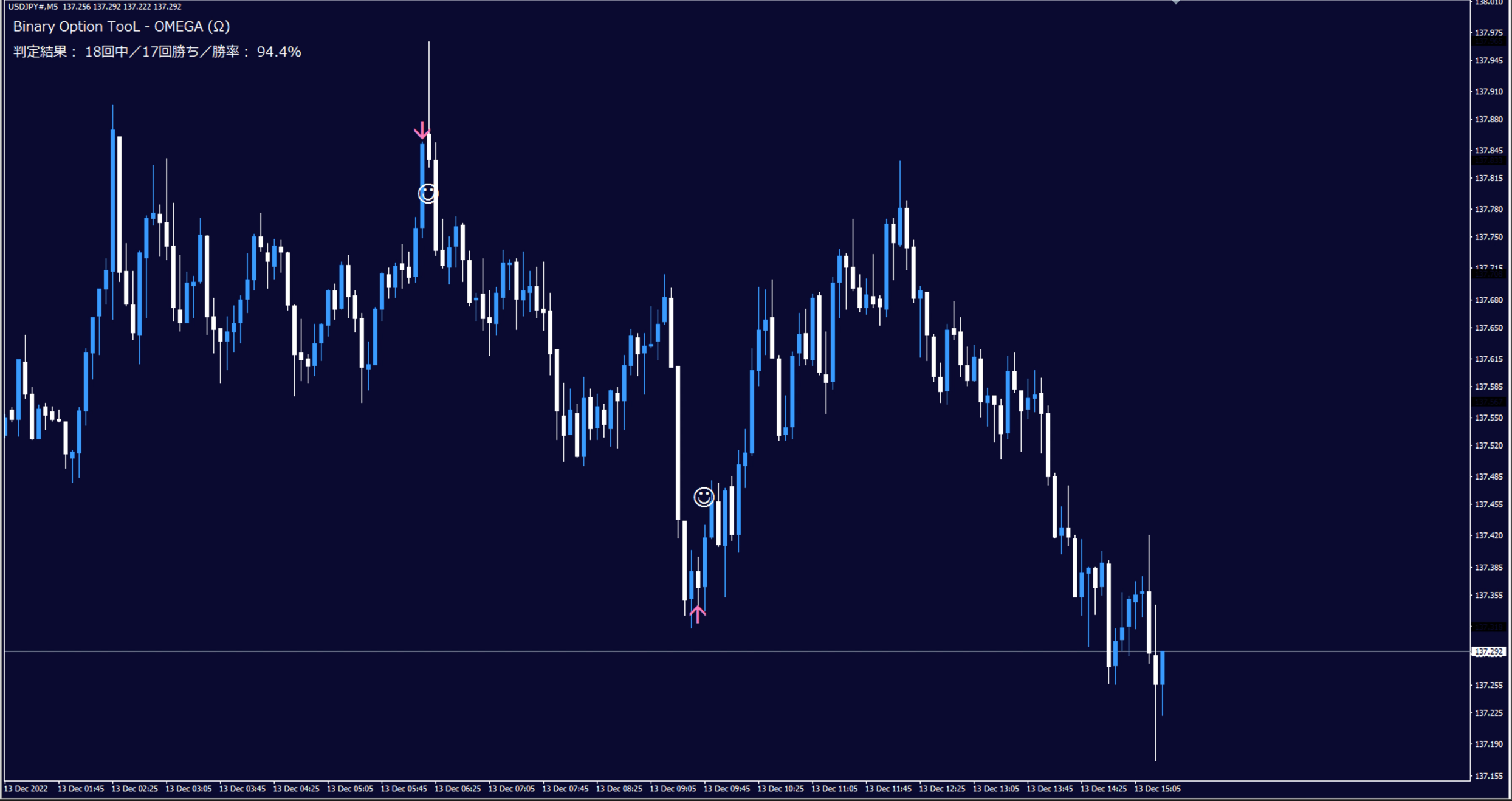
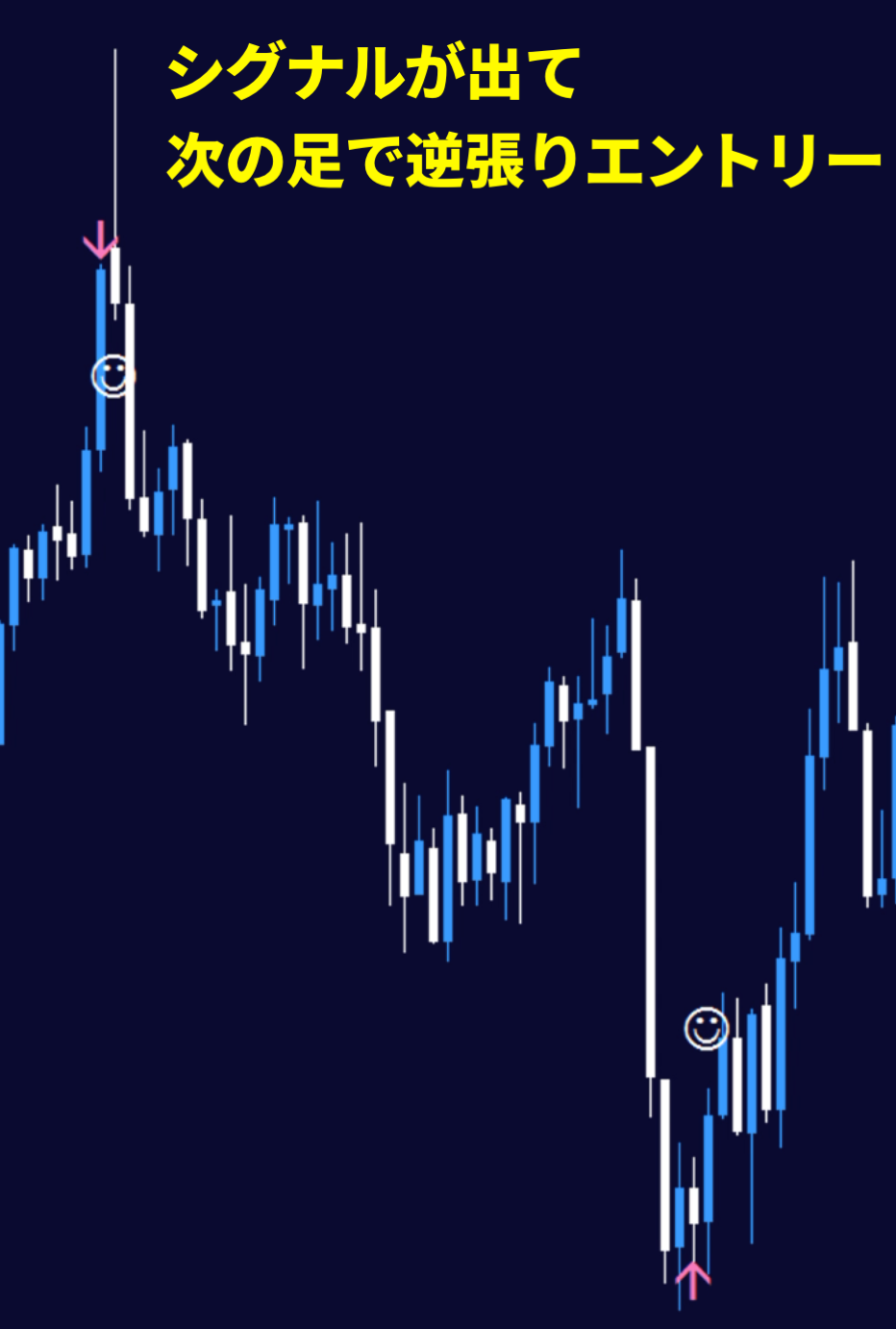
Simply enter when the arrow appears; a straightforward trading method
③ Win-rate display
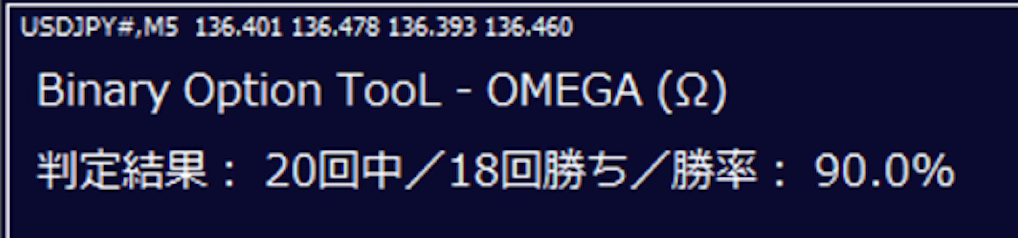
The win rate in the top-left is calculated based on the number of specified candles (default 3000 candles).
This corresponds to a 10-day win rate on a 5-minute chart, with 288 candles per day; weekends are closed for forex, so it is the win rate for the past five days (Mon–Fri) over the past two weeks.
The default display is designed to optimize oscillator settings to minimize losses over the long term. As you can see, it is a clear display without complicated interpretation!
④ Specifications✅ Arrow appears ➜ enter at the next candle
✅ A signal appearance filter specialized for contrarian signals✅ No repaint✅ Win-rate judged by the number of candles within the specified range
✅ One signal leads to two possible entries and resolves
✅ Recommended time frame: 5 minutes(Other time frames can also be displayed)
✅ Alerts sound when a signal occurs✅ Push notifications to smartphones (iPhone / Android)
✅ One signal leads to two possible entries and resolves
✅ Recommended time frame: 5 minutes(Other time frames can also be displayed)
✅ Alerts sound when a signal occurs
⑤ What is included✅ OMEGA Sign Tool Indicator✅ Bid_Line v2 (Indicator) to make price lines thicker and clearer✅ Templates (OMEGA indicator and Bid Line v2 should be inserted from Navigator)
✅ Manual (PDF)
MT4-exclusive Trend Line Indicator (Introduction video) Note: Google Chrome recommended for playback
Drawing video of the Trend Line Tool (5 days non-stop recording) Note: Google Chrome recommended for playback
Contrarian Tool OMEGA