

[MT4 Discretionary Trader Must-See] One-click Instant Order Placement - Drag SL/TP to Adjust - Batch Settlement Completed with a Simple, Focused Panel EA "Entry Payment"
Introduction | That瞬間 delay
There are moments while watching the chart when you think, "Now is the time."
But in reality, while you open the MT4 order window, enter the lot size, set SL and TP… the candlesticks keep moving in that interval.
“It was a perfect timing, but it escaped while I was operating.”
This is the invisible stress that MT4 manual traders experience on a daily basis.
I have faced MT4 for many years as a full-time FX trader, and I know firsthand that sluggish operation degrades trade quality.
Just as improving your eye for good entry points is important,it is equally important to create an environment where you can execute that decision instantlywithout hesitation.
Entry Paymentwas created for that purpose.
A lightweight panel EA that strips away unnecessary features and focuses only on “order placement, SL/TP setting, settlement, and profit/loss check.” Because it’s simple, you can operate it intuitively, quickly, and reliably.
Five problems Entry Payment solves
This tool resolves all of the following issues that MT4 manual traders face daily.
① You miss entry timing by the hassle of opening MT4’s order window→ Immediate market orders with a single click of BUY/SELL. The order window is unnecessary.
② It’s tedious and time-consuming to manually input lot size, SL, TP each time
→ Intuitively adjust with the “+” and “−” buttons on the panel, or enter directly and press Enter. Settings carry over as is.
③ It’s cumbersome to change SL/TP after placing the order→ Drag the SL/TP lines automatically displayed on the chart with the mouse to change instantly. No need to open the order modification screen. ④ You want to see the total profit/loss of multiple positions at a glance
→ Total Pips is always displayed at the bottom of the panel. Positive is green, negative is red, with background color coding. ⑤ You want a simple order tool without unnecessary features
→ A lightweight design that includes only the necessary features. Lightweight operation, stress-free in any market condition.
In-depth explanation of core features
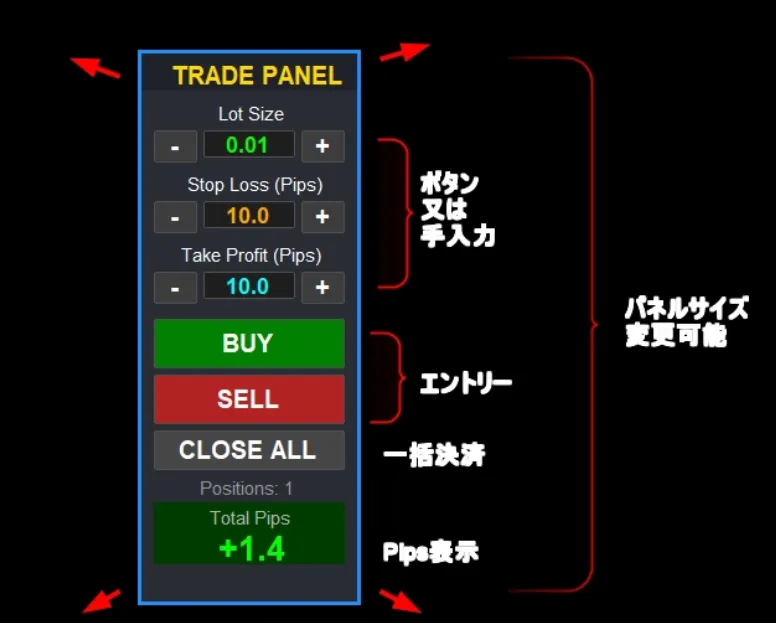
① One-click instant market orders
Click the BUY or SELL button on the panel to place an instant market order with the currently configured lot size, SL, and TP. No MT4 order dialog is needed, so you won’t miss the entry timing.
The lot size can be adjusted in 0.01 increments with the “−” and “+” buttons, or entered directly in a numeric field. Slippage tolerance can be set via parameters to prevent unintended fills during rapid changes.
② Quickly set SL/TP on the panel
Set stop loss width and take profit width in pips from the panel. Adjust by 1 pip with “−”/“+” or enter directly and press Enter to confirm. If set to 0, no SL or TP will be placed. Since SL is a basic risk management element, the panel ensures you check SL before placing a trade, preventing accidental no-SL orders.
③ Drag SL/TP lines for intuitive changes
After placing, entry line, SL line, and TP line are automatically displayed on the chart.
SL/TP lines can be price-adjusted by dragging with the mouse; releasing the mouse automatically updates the order. While dragging, labels show real-time price and pip distance, enabling intuitive adjustments. If the broker imposes stop level limits, an alert is issued.
④ Real-time Pips total for profit and loss
The total profit/loss of all held positions is always displayed at the bottom of the panel in pips. Green for positive, red for negative, with color-coded backgrounds for quick status. It can also show the number of positions held, with display on/off controlled by parameters.
⑤ Fully customizable panel size and color
You can freely resize the entire panel from 50% to 200%. Suitable for 4K monitors or smaller secondary monitors to fit your setup.
Panel border color, background color, title background, button colors, and SL/TP/entry line colors and thickness can all be changed via parameters. Initial display position can be set by X/Y coordinates, and the panel can be dragged on the chart to any preferred spot.
Basic usage (5 steps)
The tool is simple to operate. It completes in five steps:Step 1— Drag and drop the EA onto the chart to attach. The panel appears.
Step 2— Set Lot Size, Stop Loss, Take Profit by button or direct input.
Step 3— Click BUY or SELL for instant market order. Lines are automatically displayed on the chart.
Step 4— Drag the SL/TP lines as needed to adjust prices.
Step 5— Close All for bulk settlement, or close individually via MT4 standard features.
An accompanying setup manual (PDF) is included, so even beginners can follow the steps to set up.
Recommended especially for traders like this
⚡ Speed-focused discretionary traders Ideal for scalping or indicator-based trading where quick entry and exit are required. The combination of one-click order and CLOSE ALL minimizes opportunity loss due to slow operations. ? For those who want to habitualize SL/TP settings
Designed to always confirm SL/TP on the panel before placing orders, helping establish risk management habits.? For those seeking a simple tool
Suitable for users who have struggled with overly feature-rich tools. Lightweight design emphasizes intuitive operation.? For those who want a clean chart
With a single panel completing from order to settlement, the screen stays free of extra windows.
Differences from other panel EAs / Series comparison
Also available at GogoJungle:Ultimate Trade PanelandUltimate Entry PaymentWe compare them here. Entry Payment (this tool) is a simple, lightweight design specialized for one-click orders, SL/TP settings, drag adjustments, Total Pips display, and bulk settlement. It is offered at a simple price with no support and no refunds, making it suitable for those who want to try first and prefer no unnecessary features.Ultimate Entry Paymentadds real-time automatic account balance display on the panel. If you want to monitor balance while trading, this is for you.
Ultimate Trade Panelis a higher-end model that includes AUTO lot calculation (risk ratio, loss amount mode), panel size changes (50–200%), detailed color customization, a PDF setup manual, and three buyer bonuses. If you want automation for money management as well, this is best.
“I want to keep things extremely simple”→Entry Payment (this tool)
?Product page here (GogoJungle)【MT4】One-click instant order! From SL/TP settings to settlement, a discretionary trade panel EA
“I want even more automated capital management”→Ultimate Trade Panel
?Product page here (GogoJungle)
Conclusion | Simple, so you can focus on your judgment
More features do not always mean a better tool.
In trading, being able to operate without hesitation is what matters most. As you spend time navigating complicated settings, the market moves.
Entry Payment is“Place orders, set SL/TP, drag adjustments, monitor P/L, and bulk settle”five simple actions, performed quickly and reliably.
Because it’s simple, your focus remains on the chart movement and your own judgments.
If you want to reduce operation costs of MT4 manual trading, give it a try as your first tool.
?Product page here (GogoJungle)
【MT4】One-click instant orders! From SL/TP settings to settlement, a discretionary trade panel EA ※This tool is a manual trading support tool. FX trading carries principal risk of loss. Invest only with your own judgment and responsibility.