

[For MT4 Manual Traders] Real-time Balance Viewing, One-Click Entry & Bulk Settlement — Simple-Designed Trade Panel EA "Ultimate Entry Payment"
Introduction | Are you trading while constantly checking “how much money do you have right now?”
During trading, do you face situations like this?
“I want to enter, but what’s my current balance again?”
Open the MT4 terminal window below to check, then go back to the chart…
During those few seconds, the chart is moving.
By just checking the balance, you miss out on opportunities.
This is by no means an exaggeration.
Moreover, many traders have experience entering without checking the balance and unintentionally taking on too much risk.
As a full-time FX trader who has used MT4 daily, I arrived at the conclusion that “account balance should always be visible on the chart.”
Therefore, I developedUltimate Entry Payment .
It is a simple, focused panel EA for discretionary traders that completes everything from real-time balance display and lot/SL/TP settings to one-click orders and bulk closes on the chart.
Three hassles that Ultimate Entry Payment solves
This tool is designed to eliminate the following three hassles that MT4 manual traders deal with daily.
Hassle 1: The bother of opening the terminal each time to check the balance
The balance is shown in real-time on the panel at all times. No need to switch screens.
Hassle 2: The bother of opening MT4’s standard order screen for every entry
Press the BUY or SELL button to place an order instantly at the current Ask/Bid price. You no longer need to open the order screen and manually enter the lot size.
Hassle 3: The bother of closing multiple positions one by one
You can close all held positions with a bulk close button. This allows quick response during sudden price movements.
Detailed explanation of core features
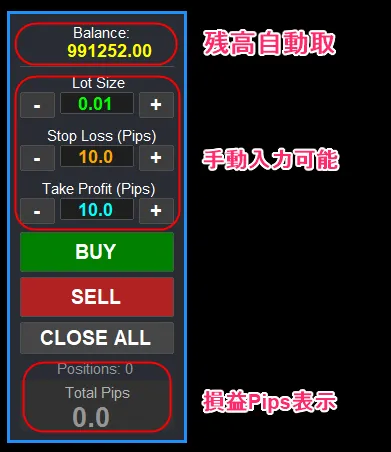
① Real-time automatic balance display
The standout feature of this tool isreal-time automatic display of account balance.
Because the panel always shows the current balance, you can instantly judge whether a given lot size is within your funds without taking your eyes off the chart.
Fund management is the backbone of trading. Keeping the balance in sight directly supports calm, rational decision-making.
② One-click BUY/SELL immediate order
Just press the BUY or SELL button on the always-on chart panel to place an order at the current market price instantly.
There’s no need to open MT4’s standard order window, so you can act decisively at the moment of opportunity. This is especially effective in fast-paced scenarios like scalping or news-driven trades.
③ Set lot/SL/TP instantly on the panel
Before placing an order, you can set the lot size, stop loss (SL), and take profit (TP) on the panel. The “+” and “−” buttons let you adjust intuitively, and the values reflect directly in the order.
No need to re-enter each time; you can carry over the settings from the previous trade.
④ Bulk close all positions with one button
By pressing the bulk close button, you close all positions you hold for the currently displayed currency pair.
During rapid market moves or at the end of a day trade, you can respond quickly and comprehensively without any hassle.
Who this is especially recommended for
This tool is particularly suitable for the following traders.
・MT4 manual traders who want to simplify entry operations as much as possible
・Traders who want to trade with their account balance always in view
・Traders who need quick entries and exits for scalping or day trading
・People who don’t need complex features and want to simply complete ordering, balance checking, and settlementin a straightforward way.
・People who want to try using a trading panel EA for the first time
Differences and usage guide for Ultimate Trade Panel
We’ll compare withUltimate Trade Panel, also sold on GogoJungle.
Ultimate Entry Payment (this tool) is a simple design focused on real-time balance display, one-click orders, and bulk closes. We minimize required features and prioritize ease of use. It is suited for first-time users of a panel EA or for those who value simplicity over feature richness.
Ultimate Trade Paneladds more features on top, including AUTO lot calculation (risk ratio, loss amount mode), drag-adjustable SL/TP lines, full panel and line color customization, panel size adjustment (50–200%), and more. If you want automated money management and detailed customization, this is the better choice.
?Product page here (GogoJungle)
“I want to start simple” →Ultimate Entry Payment“I want to automate funds management and use it more seriously” →Ultimate Trade Panel
I think this is the clearest way to distinguish them.
Notes and those not suited
Please check the following before purchasing.
This tool isWindows PC version of MT4 only. It does not work on the Web MT4, mobile apps, Mac, or MT5.
Also, it is not suited for the following people.
・People looking for fully automated trading (automatic entry and exit). This tool is a manual trading assist tool
・People who do not use MT4 or have no plan to
・People seeking a system that instantly makes profits. This tool is a trading efficiency assistance tool
FX trading involves risk of principal loss. Please invest with your own judgment and responsibility.
Summary | Make discretionary trading simpler
Keep the balance in view at all times, enter with one click, and close all with one click.
With MT4’s standard操作, this always required several extra steps.
Ultimate Entry Payment eliminates those several steps.
By providing a simple, fast, and reliable environment, you can focus on the decision-making itself.
It is an ideal first step for traders who want to start with a user-friendly panel tool.
?Product page here (GogoJungle)
【MT4】Ultimate Entry Payment | Real-time balance display & entry/settlement panel EA
※This tool is a manual trading helper tool. FX trading involves risk of principal loss. Please invest with your own judgment and responsibility.