

[MT4 Manual Traders Must See] One-click Orders, Batch Settlements, and Pips Profit/Loss Display Condensed into a Single Panel | Trade Panel EA that Also Automates Funds Management
Introduction|The "Annoyances" MT4 Manual Traders Face
"All right, now! Let's enter"
The moment you think that, you click to open the MT4 order window, input the lot size, and set SL and TP…
Meanwhile, the opportunity has already disappeared.
If you’re manually trading on MT4, scenes like this are commonplace. The market won’t wait. The sluggishness of operations directly translates into trading results.
Furthermore, aren’t you facing these kinds of concerns?
・It's tedious to calculate the lot size every time by hand, and fear of calculation errors
・With multiple positions, you can’t immediately tell the total profit/loss
・Opening the order modification window every time you change SL/TP is bothersome
・When prices move sharply, you want to close all positions at once, but you’re closing them one by one
As a full-time FX trader using MT4 daily, I have firsthand experience of how these “operational costs” degrade trading quality.
That’s why I developedUltimate Trade Panel.
What this tool can solve
In a word, this tool is a trade panel EA designed to minimize every manual operation for MT4 manual traders.
From a panel that resides on the chart, you can complete entry, closing, profit/loss checks, and lot management. There is no longer any need to open MT4’s standard order window.
Thorough explanation of 7 features
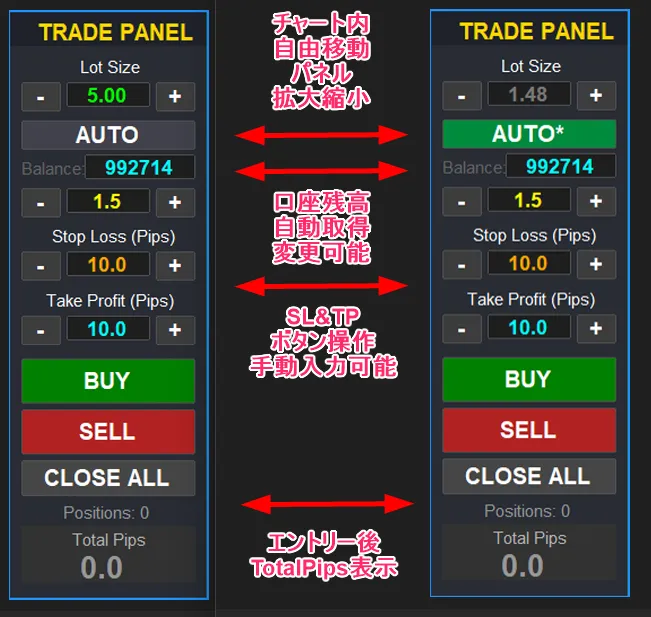
① One-click Entry
Simply press the BUY or SELL button displayed on the chart panel, and an order is placed immediately at the current Ask/Bid price.
Lot size, SL, and TP are preset on the panel using the “+” and “−” buttons. You won’t have to re-enter them each time. You can act without hesitation at the moment of opportunity.
② [NEW] AUTO Lot Calculation for Automated Capital Management
This is the most notable new feature added in this version.
The most important thing in trading is not the entry precision but risk management.
No matter how good the signal is, if the lot size isn’t appropriate, a single loss can cause significant damage.
Just turn the AUTO button ON, and it will automatically calculate the optimal lot size from the set risk ratio (%) or allowable loss amount and SL width, and reflect it instantly in Lot Size.
Two calculation modes are provided.
Calculation Mode ① Loss Ratio (%) ModeBalance × Risk% ÷ (SL pips × pip value) = Lot size
Calculation Mode ② Loss Amount ModeAllowable loss ÷ (SL pips × pip value) = Lot size
You can also choose how to obtain the reference balance. There are two modes: the normal mode that automatically fetches surplus margin in real time, and a mode where you manually input an amount in the Balance field for calculation.
Manual input mode is especially convenient when you want to calculate lots on a demo account using the expected balance of a real account, or when you want to standardize the same lot basis across multiple accounts.
③ CLOSE ALL button for bulk close of all positions
Just press the CLOSE ALL button to close all positions currently displayed for the currency pair.
When there is a sudden market move or at day’s end you want to close multiple positions at once, it’s done in one click. You’re freed from the hassle and stress of closing them individually.
④ Real-time Pips Profit/Loss Display
At the bottom of the panel, “Positions (number of open positions)” and “Total Pips (total profit/loss)” are displayed in real time.
Color-coded intuitively: green (Lime) for positive, red for negative, gray for zero. With the total of multiple positions visible at a glance, deciding take-profit and stop-loss timing becomes smoother.
⑤ Drag to intuitively adjust SL/TP lines
After entering, three lines automatically appear on the chart: the entry line (blue dotted), SL line (red solid), and TP line (green solid).
You can drag the SL and TP lines with the mouse to adjust prices. No need to open the order modification window—manage positions intuitively while looking at the chart.
⑥ Fully customizable panel and line colors
You can freely change panel border color, background color, BUY/SELL/CLOSE ALL button colors, text colors, and SL/TP/entry line colors and thickness from the parameters.
Default colors are already highly legible, but you can fine-tune to fit your chart environment. The panel itself can also be dragged to any position you like.
⑦ Panel size adjustment support (50–200%)
Panel size can be freely adjusted within 50%–200%. On 4K displays or smaller secondary monitors, adjust to the optimal size for your setup.
Scenes Where It Shines in Particular
The tool excels especially in the following situations.
ScalpingHere, rapid entries and closures are essential. The combination of one-click orders and CLOSE ALL minimizes opportunity loss due to slow operations. AUTO Lot also eliminates the need to calculate lots for each trade.
Day tradingHere, you can monitor the profit/loss of multiple positions in Total Pips while trading. All the information you need for decisions is consolidated in one panel.
Indicator tradingIn rapid moves, immediate entry and instant full closure are required. The existence of the CLOSE ALL button is especially important in these situations.
Thorough capital managementFor traders who emphasize risk management, AUTO lot calculation is particularly appealing. By fixing the risk ratio and automatically enforcing consistent lot sizing, it brings trading closer to being emotion-free.
Buyer Benefits (3 points)
The tool comes with the following three benefits.
【Benefit 1】Capital Management Rules FX Beginners Must Follow (PDF)A document explaining risk management concepts to prevent a single loss from wiping you out. Used in combination with AUTO LOT, you can achieve more consistent capital management.
【Benefit 2】FX Lot Calculation Sheet (Excel)An Excel sheet useful when you want to manually calculate lots or pre-check multiple scenarios.
【Benefit 3】Understanding FX Entry via Investor Psychology × MT4 Indicators (PDF)A guide to understanding investor psychology behind chart movements and improving entry accuracy.
Frequently Asked Questions
Q. Is the setup difficult?
No, it’s very easy. Copy the downloaded ex4 file into MT4’s Experts folder, then drag and drop onto a chart. The included setup manual (PDF) provides detailed steps, so you can proceed with confidence.
Q. Is this automated trading or manual?
This tool is an EA that assists manual trading. It does not automatically enter or exit trades. You must press the BUY/SELL buttons yourself. As an EA, it requires enabling MT4’s AutoTrading button.
Q. I got “Error: 130” at entry.
This occurs when SL/TP is too close to the broker’s stop level. Increase SL/TP values slightly before entering. After entry, you can also drag the SL/TP lines to adjust.
Q. Can the panel or line colors be changed?
Yes, everything can be changed. Panel border color, background color, button colors, text colors, and SL/TP/entry line colors and thickness can be customized in detail.
Notes and Those Not Suited
Before purchasing this tool, please check the following.
This tool isWindows PC version MT4 only. It does not operate on Web MT4, mobile apps, Mac, or MT5.
Also, it is not suitable for those who:
・Are already looking for automated trading EAs (this tool is a manual aid)
・Do not use MT4 or have no plan to use it
・Are seeking a system that yields immediate profits (this tool is for streamlining trading operations)
Summary|Make Manual Trading Simpler
Delays in entry, lot calculation errors, difficulties tracking multiple positions, and the hassle of changing SL/TP.
These daily stresses felt by MT4 manual traders are all consolidated and solved byUltimate Trade Panel in one panel.
Less operation means you can focus on decision making. If you can focus on decisions, the quality of trading improves.
With the new AUTO LOT calculation feature, capital management is automated as well.
A simple panel resident on the chart can fundamentally change your trading setup.
?Product page here (GogoJungle)
※This tool is a manual trading aid. FX trading involves the risk of principal loss. Please invest with your own judgment and responsibility.