【First-come, 0.5GB extra for a limited time!】 Even beginners can use it super easily with the first month free<FX-dedicated affordable VPS>
VPS for automated trading!
With BestNet's VPS, FX-dedicated VPS is affordable and easy to use!
A FX-focused VPS with no cumbersome procedures at all!
MT4 can be installed on your familiar Windows PC right away.
Limited-time campaign!
From January 25, 2017
[First 30 customers only]
The 1GB plan is 1,280 yen per month, now increased to 1.5GB!
If you go with the 1GB plan…
MT4 can run five simultaneously without any issues.
For those who want to try VPS for the first time and have a small number of EAs runningThis is a plan for light users.
First 30 customers only: 1.5GB RAM VPS available for 1,280 yen per month

[First 10 customers only]
The 2GB plan normally costs 2,380 yen per month, now increased to 2.5GB!
With the 2.5GB plan…
You can also run about 20 MT4 instances!
It's a sufficient capacity for testing or running many EAs across multiple MT4s.
First 10 customers only: 2.5GB RAM VPS available for 1,280 yen per month
/Cheaper than major competitors! BestNet's VPS is highly recommended here!/
1. All plans: first month free! If you cancel within one month, no charges apply
2. Since it's an SSD-based VM, performance is smooth
3. Data protection via RAID mirroring
4. Equipped with an automatic generator that starts during power outages, allowing uninterrupted operation as long as fuel supply continues during disasters
5. An architecture with a standby line that automatically switches to the standby when the main line goes down
6. Designed to run MT4 stably, delivering low cost and fast operation
Compare of each plan here (as of 2017.1.25)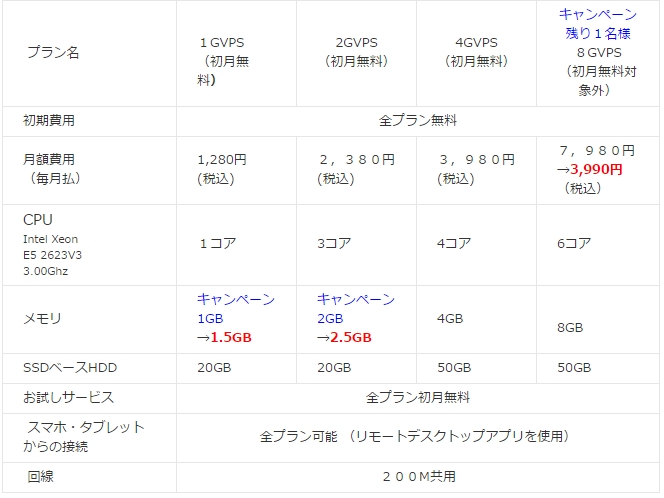
The steps to use are simple!
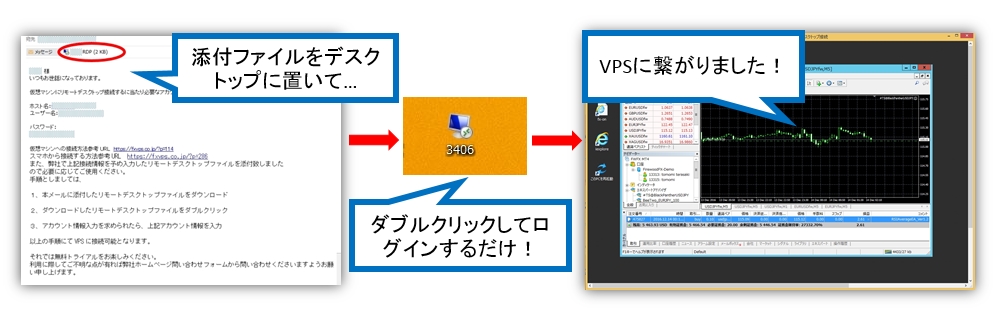
1. When you purchase a plan on fx-on, VPS information from BestNet will be sent to your email address.
2. Save the VPS connection icon attached in the email to your desktop.
3. Enter the login information to complete the connection!
You can connect to the VPS in just three steps.
Installing MT4 on the VPS is the same as on a normal PC.
Within the VPS, connect to the Internet and obtain MT4 from the broker's site.
EA files can be moved by copying and pasting from your local PC.
■For those wondering which plan is best
If you have one MT4 account and about one EA, the 1GB plan is sufficient.
If you want to run multiple EAs on one account, or run many EAs on multiple accounts,
it's better to choose a larger memory plan, but
In the case of BestNet,if memory runs short due to EA operation, you will be notified to upgrade to a higher plan
you will be notified to upgradeas such.
If you're not very familiar with EAs but want to run them on a VPS, it's a friendly service indeed.
More than anythingFirst month free, so why not give it a try!
For other ongoing campaigns and details of other plans,
Please check the BestNet homepage for updates
written by Tera fx-on.com