

A Checklist to Unmask the Behind-the-Scenes of the Cleverly Disguised "Imitation AI Indicator/EA"
Hello. This is YUME.
In the previous article,『Comprehensive explanation of the characteristics of genuine AI indicators』was written about.
This time,『The decisive differences between fake AI indicators and real AI indicators』will be discussed.
First, when you find an "AI indicator or EA" that catches your eye on social media and the like,
before purchasing, it is recommended to ask the seller the following questions▼
?️ Three questions to avoid being deceived by fake AI indicators
① Is there a setting instruction for external communication (WebRequest)?
- Genuine:High-performance AI calculations cannot be done inside MT4. It must communicate with an external server, so MT4 will request “URL permissions.”
- Fake:The selling point is “just set it up and you’re done.” That means it is not connected to the outside, which is evidence that it is not AI but just a calculation formula
② Does the bundle include JSON or DLL files?
- Genuine:An essential “bridge” file to convey AI’s complex thinking (data) to MT4.ファイル
- Fake:
③ Is there a “one-time purchase” and what about ongoing costs?
- Genuine:Running an AI server incurs monthly electricity and maintenance costs. Therefore, monthly subscriptions are common.
- Fake:A few tens of thousands yen for a “one-time purchase.” The idea that the seller will cover server costs years later is not realistic in the world of investment.
? Conclusion:Do not be dazzled by the glittering word “AI.” First, confirm the physical evidence of the file structure.
If the contents are empty, no matter how huge the profits, it’s simply arithmetic.
However, even if the seller answers, “the purchasable files are available,” you still cannot be at ease.
The reason will be explained in detail below.
?️♂️ A checklist to expose the裏 side of sophisticated “camouflaged AI”
If a scammer prepares dummy “external files” or “communication settings,” verify the実態 using the following points.
1. Check the contents of the communication log
- Verification method: check the “Terminal” window > “Experts” tab
- Camouflage:
- How to tell:
2. The DLL file “signature” and “behavior”
- Verification method: Right-click the included .dll file > Properties > verify the digital signature
。 - Camouflage:
- How to tell:
3. Suspecting the size of a “trained model”
- Verification method:
- Camouflage:
- How to tell:
? Final takeaway: They are “showy” professionals, but they cannot fake the underlying logic. “Why is a signal appearing now, here?” If the seller cannot answer this logically without using the word AI, they are 100% fake.
?️♂️ A place that cannot lie: How to read the MT4 “Experts” tab
If you are considering or have purchased tools that boast “AI-enabled,”
the first thing to check is at the bottom of MT4 in the“Terminal”, then“Experts” tab.
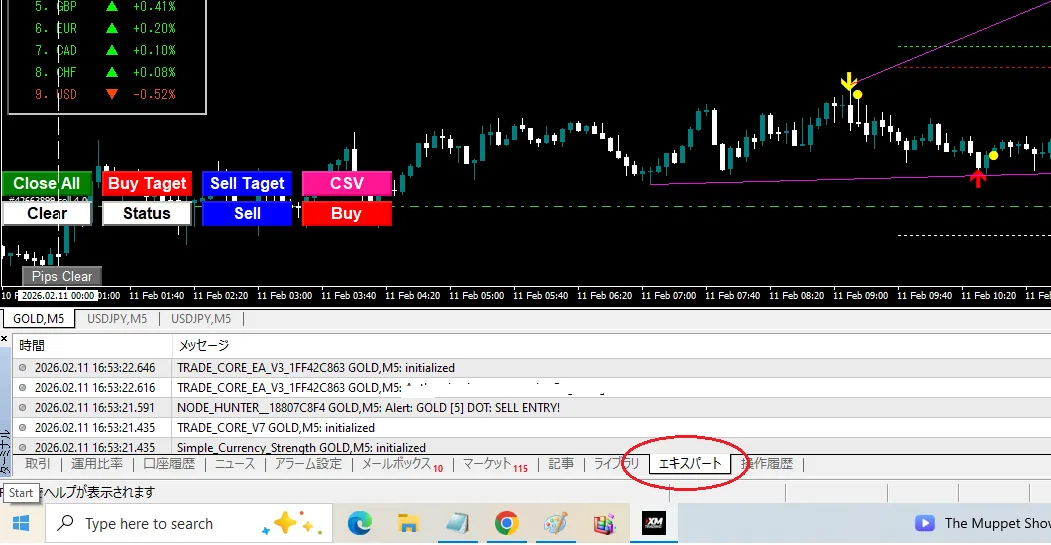
Here, everything about the program’s true intention is recorded.
1. Network disconnection test (the strongest discriminator)
With MT4 running, disable the PC’s Wi-Fi or unplug the LAN cable.
- If it is real AI:
WebRequest failedError connecting to AI Serverwill appear, and the signal calculations will stop. Since it cannot connect to the external brain, it will normally stop functioning. - If it is fake AI:Even with the network disconnected, new signals continue to appear as if nothing happened. This is definitive evidence that it is not AI and is just an old calculation formula running on your PC.
2. Check the URL in the communication log
In the log,WebRequest: https://...If you see such records, verify the URL.
- Warning signal!If the destination is the seller’s homepage top page or an authentication server (only for account verification), that is not AI computation communication. It could be just a copyguard check disguised as AI communication.
3. The presence of a DLL load
If a library (.dll) is loaded to run AI, there will always be a log at startup.
Loaded 'xxxx.dll'If there is no such log yet sophisticated AI inference claims to work, that is physically impossible.
? Second installment conclusion:Trust MT4 logs more than the seller’s words. Even if there are camouflage attempts, tools lacking actual communication activity are all “pretend AI.”The Expert tab is the last bulwark protecting your assets.
Expose with the Expert log! The communications fraud of “camouflaged AI”
?️♂️The truth about the Expert tab that general users do not know
We publish methods to check the MT4’s backstage that only developers know. Look here and the seller’s claim of “communicating with AI” collapses in an instant.1. The decisive difference between account authentication and AI communication
Sellers often say, “We set up WebRequest (communication) so it’s AI,” but the exact identity becomes clear when you inspect the logs in detail.
- Only account authentication (fake AI):A single communication log appears right after the indicator is set. It merely checks whether your account number is correct on the seller’s server.
- Genuine AI:Logs appear continually as the candlesticks move or every few seconds. AI must constantly send current price data to the external brain (server) and receive answers.If logs stop completely except at startup, that is not AI.
2. Pay attention to the URL appearing in the logs!
Check the end of the URL shown in the Expert tab.
.../auth.phpand.../license.php→ This is simply a copyguard (web authentication)..../predictand.../analyzeand.../v1/completions→ This is evidence of the inference (AI calculation).
※ If you don’t understand how to read the Expert tab logs,
have ChatGPT and others analyze the logs.
AI excels at data analysis like these logs, and can detail parts humans often overlook.
Also, such “AI-based data analysis” can be performed not only on Expert logs but also on other data published on sales pages, such as“unusually high win-rate trade histories.”can be analyzed.
AI vs traditional indicators: the decisive difference in communications logs
?️♂️ Detecting with logs! Whether it is real intelligence or just formulas
By looking at the frequency and content of logs recorded in MT4’s “Experts” tab, you can determine authenticity of AI in an instant.
1. Traditional indicators (even fake AI falls here)
- Log content:
[Indicator Name] initialized successfully - Timing:Only when the indicator is set or MT4 is started.
- Feature:After that, no matter how price moves, the log remains silent. This is because all calculations are completed within a fixed formula on your PC.
2. Real AI indicators
- Log content:
WebRequest sent to https://ai-api.server.com/predict...andResponse received: {\"signal\": \"buy\", \"confidence\": 0.85} - Timing: On every price movement (tick) or every time a candle updates, logs flow continuously.
- Feature:AI constantly analyzes current market data on an external server, so log records never stop.
3. Don’t be fooled by cunning “web authentication”!
Scammers say, “There are communication logs, so it’s AI!” But check the URL carefully.
- Suspicious URL:
.../check_license.phpand.../verify_user.php→ This is only confirming whether you are the legitimate purchaser. It has nothing to do with AI computation. - Genuine URL:
.../v1/inferenceand.../market_analysis→ This is evidence of sending data to analyze the market.
鑑定のポイント:“If, except at startup, the log is dead, it is not AI.” Emphasize this simple fact in the second article. No matter how the seller excuses by saying they “hide it in the code,” MT4’s WebRequest cannot be made to hide all logs.
Summary
Thus, by checking the MT4 terminal’s “Experts” tab logs, you can determine whether it is an AI indicator or an EA.
Additionally,genuine AI indicators involve external integration as a matter of course.
It is common for products to include files other than the main indicator itself.
Even if,DLL or JSON files are included,
the Expert tab will tell the truth.
That’s it. I hope this will be helpful in the future?
※ AI is not the benchmark for indicators from now on,
but here we offer many indicators ▼
◆ Scalp Signal
◆Gold-focused scalp signal with semi-automatic exit EA included