

[Confusion Prevention] Differences between line touch moment, confirmation, moment + confirmation of the Prime Combo Signal
【Disorder Prevention】 Differences between Line Touch Moment, Confirmation, Moment + Confirmation for Prime Combo Signal
This is Shirou!
As Prime Combo Signal presents many items, do you have concerns like the following?

Not sure about the difference between the line touch entry moment and confirmation for Prime Combo Signal

What is Moment + Confirmation?
In this article, we summarize the differences of Prime Combo Signal entries
Between Line Touch Moment / Confirmation / Moment + Confirmation
and share them with you.
What is a Line Touch Entry in Prime Combo Signal
As you may already know, a line touch entry in Prime Combo Signal looks like this.
Moment Entry
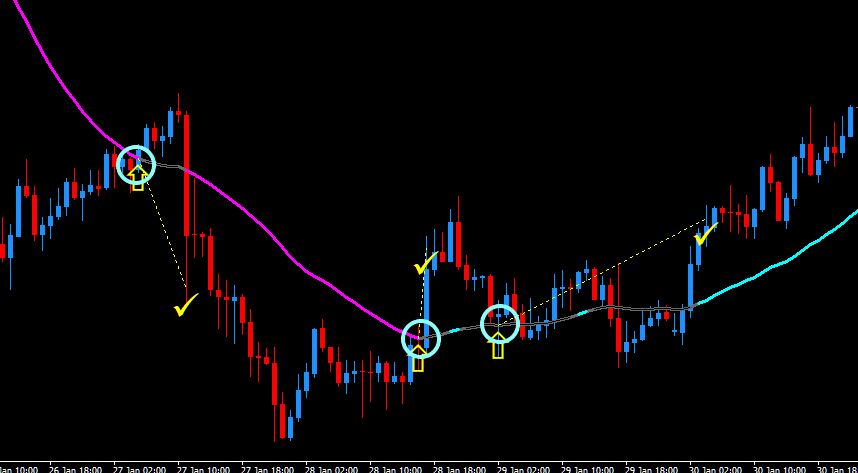
When the conditions are met, if the price touches the top and bottom lines, enter.
This is the basics.
Confirmation Entry occurs when the conditions are met and the price touches the top and bottom lines, thenenter at the open of the next candle.
Confirmation Entry
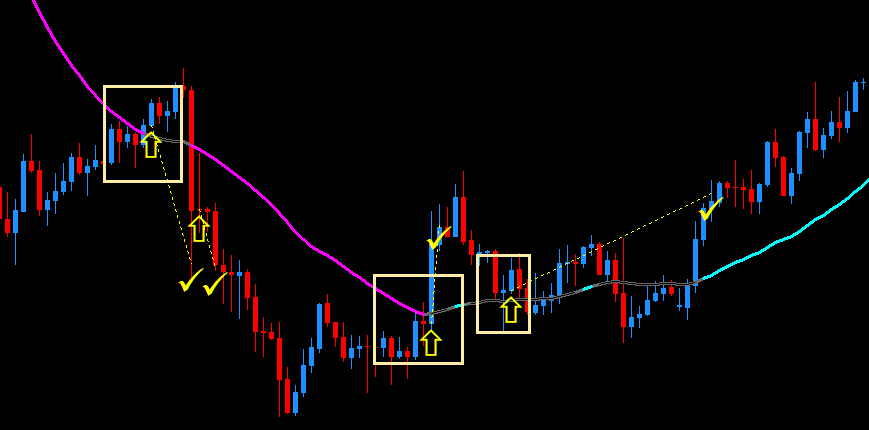
Compared to Moment, the confirmation entry is entered at the open of the candle one bar later.
This is the difference between Moment Entry and Confirmation Entry.
【Disorder Prevention】 About Line Touch Moment + Confirmation in Prime Combo Signal
What is Line Touch Moment + Confirmation in Prime Combo Signal?
This means that when the conditions are met,
the indicator on the previous candle is correct when it touches the top and bottom lines, and an entry occurs
.
Let's look at the image of the Moment Entry again.
In Moment Entry, if the line is touched and the conditions are met, an entry occurs.
Confirmation Entry occurs at the next candle after the touch.
Moment + Confirmation is entered at the moment when the conditions are met on the previous candle.
A note:
Line Touch Moment + Confirmationrequires MTF to be set to Moment.
Let me summarize.
Summary
| Line TouchMoment | Line TouchConfirmation | Line Touch Moment +Confirmation | |
|---|---|---|---|
| MTF Moment | Entry signal appears when the conditions are met at the moment of line touch | Signal appears on the candle after the line touch when the conditions are met | Judged on the candle one before, and if met, signal appears |
| MTF Confirmation | Signal appears if the higher timeframe is confirmed | Not possible.Operates with MTF Moment settings |
Differences in win rate and repaint
| Line TouchMoment | Line TouchConfirmation | Line Touch Moment +Confirmation | |
|---|---|---|---|
| Win rate | High | Low | Medium |
| Repaint | Yes | No | Exists, but greatly reduced compared to moment. Almost none |
In short, Line Touch Moment + Confirmation is judged based on the indicator state of the candle one bar before.
One-bar back means that even with MTF, it will always be correct for at least one bar, making repaint less likely.
Personal impressions and thoughts

If aiming for no repaint as much as possible, Line Touch Moment + Confirmation is good.
However, I think it’s better to limit MTF to only one higher timeframe you can use.
On a 15-minute chart
- One hour: 4 bars, then confirmed
- Four hours: 16 bars, then confirmed
On a 4-hour chart, the number of color changes until confirmation is high, which is disadvantageous.
Actual Prime Combo Signal verifications may yield different results.
On an hourly chart, since there are 4 bars, Moment + Confirmation will always have at least one correct, so not 100% perfect, but you can aim for no repaint.
As the manual mentions, reducing MTF as much as possible helps avoid repaint in this case.
Ideally, use only one MTF and stick with it.
Furthermore,with the current setting filter, judgment is made by confirmed indicatorsso the current filter is also useful.