

【Complete Strategy】ELDRA SL/TP Settings to Increase Winning Rate! Pro's Must-Use Ironclad Techniques Revealed
? 【Complete Strategy】 Increase win rate with ELDRA SL/TP settings!
Professional-grade techniques revealed
“How should I set stop loss?”
That frustration ends today. After reading this article, you’ll learn all the secrets of SL/TP settings used by traders achieving monthly returns over 20%!
Hello! ELDRA users, are your stop loss (SL) and take profit (TP) settings properly configured?
Actually,More than 80% of ELDRA users lose money on SL/TP settings—a shocking fact. But conversely,simply knowing the correct settings can put you in the top 20%!
This time, we’ll fully disclose the“truly profitable SL/TP settings”as heard from professional traders achieving over 20% monthly return.
? Don’t miss out! The importance of SL/TP settings
First, why are SL/TP settings so important? The answer is simple.
✅ Three reasons why SL/TP settings matter
- Protect your capital:Prevent major losses with proper SL
- Maximize profits:Secure profits with TP
- Stabilize psychology:Feel secure with a preset
One user reportedly revised SL settings andreduced monthly losses by half—that much can change with one setting.
? Top 3 pro-standard settings
We’ll introduce three level-based settings actually used by profitable traders.
? For beginners: safety-first setting
? Settings
| Item | Value |
| Stop Loss | Points = 100pts |
| Take Profit | RR ratio = 2.0 |
| Auto grant | ON (one-time) |
Why is this setting good?
Fixing SL at 100pts ensuresone loss is limitedand since TP is automatically calculated with RR 2.0,you can profit even with a 50% win rate.
? Example:One user achievedmonthly return 12%in the first month with this setup. “Profits became stable after changing the settings.”
? For intermediate: balanced setting
? Settings
| Item | Value |
| Stop Loss | Candle (low/high) |
| Take Profit | RR ratio = 2.5 |
| Auto grant | ON (one-time) |
Why is this setting good?
Candle type usesthe most recent high/low of the candlestickto adjust SL in step with market moves,enabling flexible SLthat’s smarter than fixed values!
? Earnings example:With this setting, many users reliably earn18-25%monthly. The key is SL that moves dynamically with the market.
? For advanced: aggressive setting
? Settings
| Item | Value |
| Stop Loss | ZigZag |
| Take Profit | RR ratio = 3.5 |
| Auto grant | ON (update) |
Why is this setting good?
ZigZag places SL atcritical support/resistancelevels, reducing unnecessary stops. With RR 3.5,even a 40% win rate can be profitable—an ultimate low-risk, high-return setup.
? Professional voices:“With this setting, I’ve consistently achievedover 30% monthly
? The magic of Risk-Reward ratio (RR)
We’ve mentioned RR many times; it’s crucial.This is extremely important.
What is RR?
Simply put,“how many times profit is sought relative to risk”.
Formula: RR = Profit target ÷ Loss risk
Example: SL=50pips, TP=150pips → RR = 150÷50 = 3.0
Why RR matters
In fact, you can profit even with a low win rateif RR is favorable. Surprised? Do the math.
? Calculating profit with 40% win rate
- Wins: 4 × 300pips =+1,200pips
- Losses: 6 × 100pips =-600pips
- Total:+600pips (profit!)
Amazing, isn’t it?40% win rate yet +600pipsprofit. This is the magic of RR.
⚙️ Use the Auto Grant feature to the max!
ELDRA’sAuto grant feature—are you using it? Not using it isreally wasteful.
Two modes of Auto Grant
? One-time
Recommendation:Discretionary traders
? Update
Recommendation:System traders
Practical example: scalping automation
Setup steps
- In Stop dialog, set “Points = 20pts”
- Auto grant ON (one-time)
- In Limit dialog, set “Points = 40pts”
- Auto grant ON (one-time)
- Save!
This will automatically set 20pts SL and 40pts TP at entry,making scalping ultra easy.
⚠️ 3 common failure patterns
We’ll outline typical mistakes users fall into. If any apply, fix them now!
❌ Failure 1: SL too tight
We get why you want to limit losses, but too-tight SL gets chopped by noise.You’ll be stopped out too often.
✅ Solution: use at least 50pts or more, adjust to currency pair volatility.
❌ Failure 2: TP too close
Placing TP too close to secure profits can cause you to miss large trends.Miss significant moves.
❌ Failure 3: Changing settings frequently
If you change settings daily thinking “this might work,” you’lllose track of what worked.
? Before/after setting changes: real examples
Let’s review data from real users before and after changes.
| Item | Before | After |
|---|---|---|
| SL setting | Points 30pts | Candle (dynamic) |
| TP setting | Points 50pts | RR 2.5 |
| Win rate | 58% | 52% |
| Monthly return | +8% | +22% |
? Result analysis
Win rate slightly dropped, butRR improvedand monthly return jumped to+8% → +22%. This demonstrates the power of risk-limited profit taking.
? Ready to use today! Checklists
✅ Check now!
- Is SL set to at least 50pts?
- Is RR 2.0 or higher?
- Is Auto Grant ON?
- Have you run with the same setting for a week?
- Have you tried the Candle type?
? Special gift
To you who read this article,“Professional SL/TP setting sheet”as a special gift!
※ Available for ELDRA purchasers via GoGoJungle My Page
? Summary: You can win just by revisiting settings
Thanks for reading to the end of this long article!
All settings introduced here areactually used by winning traders—no complicated stuff at all.
What to do today (in 5 minutes):
- Choose a setting that fits your level
- Enter settings via Stop button
- Enter settings via Limit button
- Turn on Auto Grant
- Save and finish!
Your monthly return could change starting tomorrow.
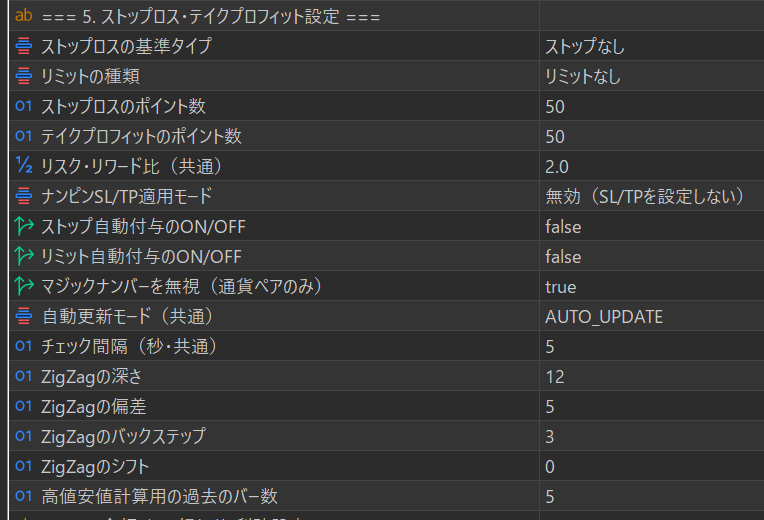
? ELDRA SL/TP Parameter Settings List
This page explains all SL/TP related parameters in ELDRA in detail.
? Table of contents
? Basic SL/TP settings
| Parameter name | Type / Options | Default value | Description |
|---|---|---|---|
| Stop loss base type (stop_base_type) |
StopType enum ・STOP_NONE ・STOPPOINTS ・ZIGZAG ・CANDLE_HIGH_LOW ・STOP_FIXED ・STOP_RISK_REWARD |
STOP_NONE | ・STOP_NONE: Do not set stop loss ・STOPPOINTS: Set away from entry price by specified points ・ZIGZAG: Use recent high/low from ZigZag indicator ・CANDLE_HIGH_LOW: Use recent candle high/low ・STOP_FIXED: Fixed stop for risk-based lot calculation ・STOP_RISK_REWARD: Calculate stop by risk-reward ratio |
| Limit type (limit_type) |
LimitType enum ・LIMIT_NONE ・LIMITPOINTS ・LIMIT_RISK_REWARD |
LIMIT_NONE | ・LIMIT_NONE: Do not set take profit ・LIMITPOINTS: Set away from entry price by specified points ・LIMIT_RISK_REWARD: Calculate based on stop loss risk-reward ratio |
| Stop loss points (StopLossPoints) |
Used when stop_base_type is STOPPOINTS. How many points away from entry price to place SL. Example: 50pts = price 50 points away from entry |
||
| Auto-stop assignment ON/OFF (auto_stop_enabled) |
Boolean (true/false) |
false | If true, automatically sets stop loss when a new position is created. Helps prevent forgetfulness,strongly recommended to set ON. |
| Auto-limit assignment ON/OFF (auto_limit_enabled) |
Boolean (true/false) |
false | If true, automatically sets take profit when a new position is created. To ensure profit taking,recommended to set ON。 |
| Nanpin SL/TP application mode (input_nanpin_sltp_mode) |
NanpinSLTPMode enum ・NANPIN_SLTP_DISABLED ・NANPIN_SLTP_ENABLED |
NANPIN_SLTP_DISABLED | ・DISABLED: Do not set SL/TP for averaged-in positions ・ENABLED: Apply standard SL/TP to averaged-in positions as well |
? Beginner-friendly recommended settings
stop_base_type =STOPPOINTS(50pts) + limit_type =LIMIT_RISK_REWARD(2.0) + auto_stop_enabled =true + auto_limit_enabled =true
? Amount-based stop loss / take profit settings
| Parameter name | Type / Options | Default value | Description |
|---|---|---|---|
| Money-based stop loss ON/OFF (parameter_input_enable_stop_loss) |
Boolean (true/false) |
false | If true, SL is managed by monetary amount instead of price.When the specified amount is reached, the position is automatically closed. |
| Money-based stop loss profit (parameter_input_stop_loss) |
30000 | Close when the loss reaches this amount (account currency). Example: 30000 = -30,000 yen loss triggers close |
|
| Loss limit (percentage of balance) (percentage_loss_limit) |
Floating (0.0-100.0) |
5.0 | What percentage of balance you’ll allow as loss. Example: 5.0 = forced close of all positions if balance falls 5% ※ Critical last line for capital protection |
⚠️ Important notes
Money-based settings can be used in conjunction with standard SL/TP. More stringent conditions trigger first.
From a money-management perspective, always enable percentage_loss_limit.
? Trailing stop settings
| Parameter name | Type / Options | Default value | Description |
|---|---|---|---|
| Trailing stop ON/OFF (use_trailing_stop) |
Boolean (true/false) |
false | If true, the stop loss automatically follows as profits grow. A powerful feature to maximize profits while reducing risk |
| First-stage trigger point (single-stage trigger point) (trailing_stop_trigger) |
When this profit point is reached, trailing stops start. Example: 500pts = start trailing at +500pts unrealized profit |
||
| First-stage trailing distance (single-stage trailing distance) (trailing_stop_offset) |
|||
| Second-stage trigger point (only in 2-stage mode) (trailing_stop_trigger_2nd) |
When this profit point is reached, switch to a tighter trailing. Example: 1000pts = +1000pts unrealized profit moves to Stage 2 |
||
| Second-stage trailing distance (Stage 2 trailing distance) (trailing_stop_offset_2nd) |
Trailing distance in Stage 2 (generally wider than Stage 1). Example: 500pts = SL trails at 500pts away in Stage 2 |
? How trailing stops work
Single-stage mode (default): after trigger, trailing at offset distance
Two-stage mode: after trigger, trailing at offset; after trigger_2nd, trailing at offset_2nd
Best for aiming big profits while securely protecting gains.
?️ Virtual stop loss settings (broker restriction countermeasures)
| Parameter name | Type / Options | Default value | Description |
|---|---|---|---|
| Virtual SL auto switch (error 4756) (virtual_sl_auto_switch) |
Boolean (true/false) |
true | If true, when the broker triggers a stop loss limit error (4756), automatically switches to a virtual SL system. ※ Required when using trailing stops |
| Emergency hard stop (%BD) (virtual_sl_emergency_percent) |
Safety device for virtual SL. Forces a hard stop at the specified % loss. Example: 2.0 = emergency hard stop triggers at 2% of balance Protection for rare virtual SL failure. |
||
| Virtual SL manual enable (virtual_sl_manual_enable) |
Boolean (true/false) |
false | If true, always uses virtual stop loss system even if no error occurs. Usually auto-switch is sufficient,recommended to keep as false. |
? What is a virtual stop loss?
Some brokers restrict frequent stop loss changes (error 4756).
The virtual stop loss systemmanages stop prices within the EA, and exits at pricereach.
Red dash lines show stop prices on the chart.
⚙️ Other SL/TP related settings
| Parameter name | Type / Options | Default value | Description |
|---|---|---|---|
| Distance for trailing limit orders (points) (input_trail_limit_distance) |
Distance to adjust pending limit orders to the price. Adjust limit orders to be this many points away from current price. |
||
| Trailing limit update interval (seconds) (input_trail_limit_interval) |
How often to update trailing limits in seconds. Too short may hit broker limits. |
||
| Stop level adjustment mode (input_stop_level_adjust_mode) |
StopLevelAdjustMode enum ・STOP_LEVEL_KEEP_ORDER ・STOP_LEVEL_AUTO_ADJUST ・FREEZE_LEVEL_AUTO_ADJUST ・STOP_LEVEL_CANCEL_ORDER |
STOP_LEVEL_KEEP_ORDER | ・KEEP_ORDER: Do not adjust (keep orders) ・AUTO_ADJUST: Automatically adjust to broker's minimum stop level ・FREEZE_LEVEL_AUTO_ADJUST: Same as AUTO_ADJUST ・CANCEL_ORDER: Cancel orders without adjustment |
| Buy SL/TP display ON/OFF (input_sltp_buy_view_on) |
Boolean (true/false) |
false | If true, displays buy position SL/TP prices on the chart with horizontal lines for easy visual confirmation. |
| Sell SL/TP display ON/OFF (input_sltp_sell_view_on) |
Boolean (true/false) |
false | If true, displays sell position SL/TP prices on the chart with horizontal lines for easy visual confirmation. |
? Level-based recommended setting examples
? For beginners: safety-focused settings
| Stop loss base type | STOPPOINTS |
| Stop loss points | 50 |
| Limit type | LIMIT_RISK_REWARD |
| Auto stop loss ON/OFF | true |
| Auto take profit ON/OFF | true |
| Trailing stop ON/OFF | false |
| Loss limit (balance %) | 5.0 |
Features: Simple and safe. No forgetting settings, reliable risk management.
? For intermediate: balanced settings
| Stop loss base type | CANDLE_HIGH_LOW |
| Limit type | LIMIT_RISK_REWARD |
| Auto stop loss ON/OFF | true |
| Auto take profit ON/OFF | true |
| Trailing stop ON/OFF | true |
| First-stage trigger point | 500 |
| First-stage trailing distance | 300 |
| Virtual SL auto switch (error 4759) | true |
Features: Use trailing stops to extend profits. Leverage technical analysis.
? For advanced: aggressive settings
| Stop loss base type | ZIGZAG |
| Limit type | LIMIT_RISK_REWARD |
| Auto stop loss ON/OFF | true |
| Auto take profit ON/OFF | true |
| Trailing stop ON/OFF | true (2-stage mode) |
| First-stage trigger point | 800 |
| First-stage trailing distance | 400 |
| Second-stage trigger point (2-stage mode only) | 1500 |
| Second-stage trailing distance (2-stage mode only) | 600 |
| Virtual SL auto switch (error 4756) | true |
Features: Aiming for big trends. Two-stage trailing to maximize profits.
? Related manuals
- → SL/TP Settings Quick Start Guide
- → SL/TP Settings Detailed Guide
- → Virtual Stop Loss System Manual
ELDRA Version 1.40+ | © 2025 ELDRA Project