
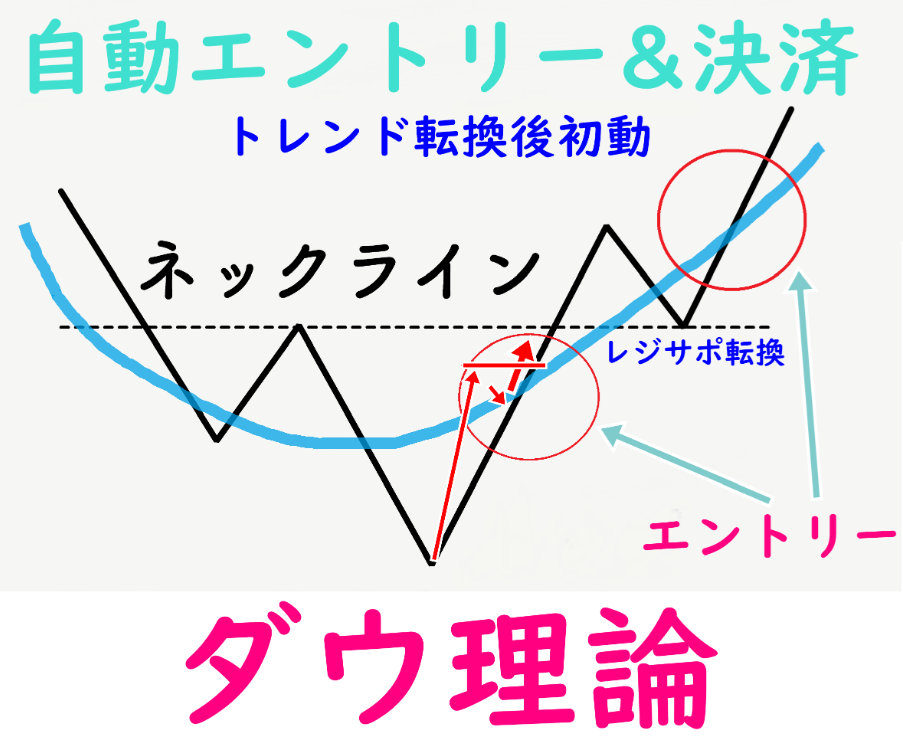
“Dow Theory” Auto-Trading EA Product Manual
Thank you for viewing.
Please bookmark this page,
and please take a look until the end.
Multi-currency (3–5) dedicated EAs are directed to ①
Single-currency EAs apply to the specified currency on the chart and proceed to ②
☆ Settings that require対応
① Open all 1-hour charts for the specified currency and install the EA
The EA for operating five currencies simultaneously is USDJPY, EURJPY, EURUSD, GBPJPY, and GBPUSD.
For swap-focused EAs three currencies USDJPY, EURJPY, EURUSD are operated simultaneously.
(Setting up on a single chart will not enable simultaneous operation of multiple currencies)
Note:
There is no function to operate five currencies from a single chart display
② Tools → Options → Max bars to 20000
This EA refers to past candlesticks, so the maximum bars should be set high.
Important③ Set the lot size
The lot size on the sales page is only the initial display.
Please be sure to adjust the lot size for risk management.
Maximum estimated risk per 1 currency and 1 trade1 currency: 0.1 LOT = -20,000 yen; 0.01 LOT = -2,000 yen
Please choose whether to use simple interest or compound interest
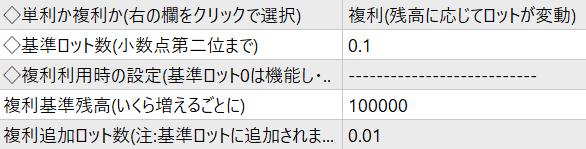
Simple interest: the base lot remains the same as the trade lot
Compound interest: as balance increases from trade results, the lot size increases accordingly
To help you understand exactly how many lots will result,the configured lot size is displayed on the chart.
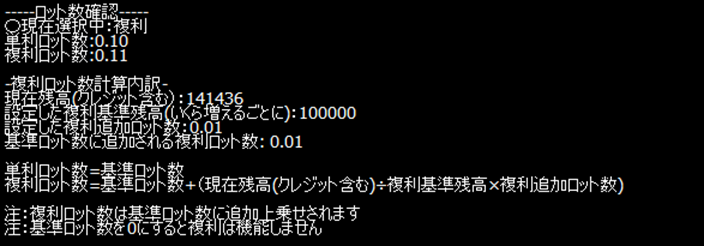
Example
Base lot: 0.02
Balance: 1,000,000
Compound balance threshold (how much increases): 100,000 yen (100k)
Additional lots: 0.01
In this case, the compound lot size becomes 0.12 LOT
Formula:Base lot 0.02 + additional compound lot 0.10 = 0.12 LOT
➃ Specify maximum number of positions (entry split count)
Positions up to the maximum number will be triggered by strategy in sequence. Both entry and take-profit will be triggered at different timings, providing diversification benefits.
Normally, risk is reduced by decreasing the lot size, but this is also used when you want to control risk by specifying a maximum number of positions.
Example: limit positions to 1 per currency
Since lot size and position count are known in advance, risk management is easier and the behavior and trade history are simpler.
The day trading method specifies whether to close positions at the end of the day (early morning 5:00–6:00).
⑤ Set up (MT4) MT5 requires enabling algorithmic trading
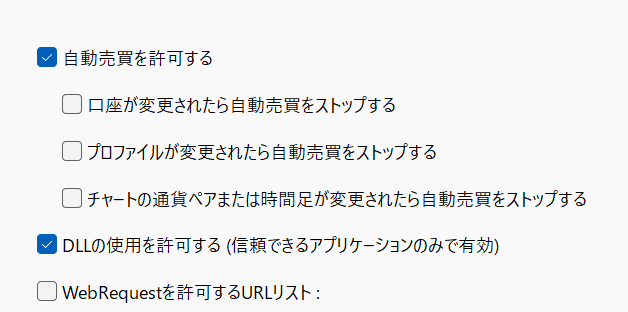
⑦ Maintain MT4/MT5
♢EA version upgrade procedure
EAs are regularly upgraded. An email labeled “Important” is sent from Gogojungle.
The upgrade method can be performed even while you hold positions. .
After deleting the old EA, please apply the new EA.
At that time, you will need to configure lot size, etc.
♢ MT4/MT5 upgrade work
Separately from the automated trading EA, MT4/MT5 may undergo periodic upgrades. If you do not perform this, automated trading may stop functioning.Updating may cause automated trading to stop functioning.Please follow the broker's upgrade requests via emails such as “Upgrade request.”
⬥ Maintain MT4/MT5 operating
If the installed device or VPS powers off, operation stops.
In other words, if your PC or VPS restarts due to maintenance or updates without you knowing, the automated trading program may stop, so please be careful.
To constantly monitor MT4 operation, in addition to daily PC or mobile checks, use REALTRADE to receive stop notices.
♢ REALTRADE stop alert email settings
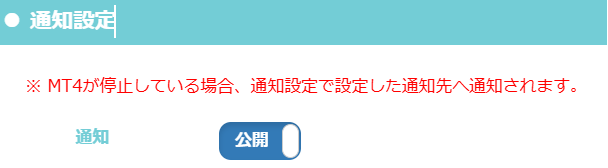
☆Post-restart checks (not a problem with this EA) When powering off the PC, do not forcefully shut down; please exit MT4/MT5 using the normal procedures.
After starting MT4/MT5, please perform the checks below each time.
・Auto-trading button is ON → For some reason, the auto-trading button may turn off.
・EA is applied to one chart per one currency and the smiley icon is smiling
→ It may happen that 1 of 10 currencies is not applied.
・(for MT4)DLL check is enabled for at least one chart per MT4→ After reboot, the check may sometimes be deselected.The network receive graph at bottom right is functioning→If an older version or common error is shown, MT4 is not running.These issues can arise due to platform, trading environment, server load, or unstable internet connections.As a caution for using MT4/MT5, please check this at least once a week if possible.
⑨ Verify the magic number
The number must be different from other EAs. Please ensure there is no overlap with other EAs.
If this EA is used alone it is okay for multiple currencies to share the same magic number. You can use it without changing the default.
If using other EAs, set different numbers to avoid management mistakes
Numbers vary by product.
☆ Other features(Configurable, but基本的に変更不要Parameter settings)♢ Spread filterSet the spread tolerance allowed at entry (within this range).
Initial setting: 1.0 recommended = MT4/MT5 spread display shows “10”
Besides spread, accounts with additional fees may require even stricter settings
◇ Consecutive entry limit
Prevents immediate re-entry after take-profit.
When performing full tests, turning off this feature speeds things up.
☆ When this happens?
Q. It rarely enters or closes positions?
A. Compared to scalping, everything feels longer on average.
Average holding time is about 2 days. Positions may be held for nearly a week, during which negative swaps can be relatively large.
Also, when entry timing comes, it tends to enter in bursts, and there are cases where it may not enter for 2–7 days.
Q.There are times of large unrealized loss, which can be worrying
A. When large unrealized losses occur, you may worry that it isn’t moving unless stopped out. Please confirm there are no mistakes in the held positions.
Please verify your held positions.
♢ Check held positions
If you use this EA on a real account and enter, you can also see entries in the sales page history. You can tell from the history that entries were made.
Append “#lz-forward” to the end of the sales page URL#lz-forward to jump directly to the trading history.
https://www.gogojungle.co.jp/systemtrade/fx/69075#lz-forward
Assign the product number to the green portion
After purchase, you can also check whether your positions are operating correctly, entry times, and held positions.
Note: Fill/quote times may vary by environment and account by a few minutes.
※Logic is built so that take-profit timing may vary depending on the time of EA installation.
※ These differences can cause scenarios like “Gogojungle page shows trades but I did not enter”
“Gogojungle page shows no trades but I entered”
such things are common and occur frequently.
☆ Other possible troubles (not problems with this EA) ① After restart, MT4/MT5 may have blank chart parameter fields (especially time) due to platform behavior.If so, resetting restores the display. The program functions even if blank.② Depending on the VPS, closing and reopening MT4/MT5 may cause the EA to disappear from charts♢ Gogojungle's view on the phenomenon of EA disappearing from charts There have been cases where the EA disappears after a version upgrade, but it depends on each EA, so the exact cause is not clear.
In our company, we have observed this often when upgrading multiple MT4 instances on one PC simultaneously (perhaps PC load), so we upgrade MT4 one by one and confirm the EA is applied.
③ Errors sounding in the early morning
When MT4/MT5 places orders during broker's off-hours or maintenance, error alerts or sounds may continue.
This means orders are being placed but entry or take-profit cannot be executed,, but this is not cause for concern. It will be resolved when broker's trading hours resume.
④ MT4/MT5 are running and appear active, but the EA is not functioning.
It is unnatural for positions to remain open without being closed.
This is not a problem with the EA but with the MT4/MT5 application/program itself.
When PC load is excessive, MT4/MT5 may be pushed to near termination.
To prevent this,please, if possible restart once a week to re-recognize the EA. If the take-profit point has passed, restarting may cause the EA to act and close positions immediately.
☆ Frequently Asked Questions
Q. Is it okay to run during major economic indicators?
Q. Do you recommend managing the EA by stopping during busy market times?
A. The policy is not to stop operation (auto trading remains always on).
In scenes where big moves are expected, there is a big risk but also a big opportunity, so we accept all of these and keep normal operation during special events as well. therefore, even during special events, it remains within normal operation.
♢ This EA (except for swap-focused type) flexibly handles both buy and sell and shifts trading direction.
In rising phases it buys; in falling phases it sells.
In that sense, we believe it can adapt to events that move markets easily.
♢ While the above policy is in place, there are cases where trades end up worse off, and you may think, “I should have stopped.” For this reason, customers may decide to stop auto trading or manually close positions in an emergency without issue.
♢ Cautions
Always set enough lots to withstand any economic indicators that may be announced.
(This can also occur in normal discretionary trading, so respond as appropriate)
Q. Do you restart the VPS on weekends, and will positions or operation be affected after MT4/MT5 restart?
Q. If I plan to restart during weekends when currencies are not moving, will the EA re-recognize my positions and proceed to close?
After restart, the EA will re-recognize held positions and proceed to close them.
After restarting, please verify that MT4/MT5 are operating normally each time.
Q. Do you keep positions across weeks as a system?
Yes. It stays ON and continues operating.
In doing so, negative swaps may be large, but
the strategy continues to maximize performance by accepting the negatives.
※ If you are worried about carryover on weekends due to sudden volatility, you may manually settle at Friday's end according to your judgment.
Q. Is there any plan to develop a MT5 version?
MT5 version is not yet released, but there is a possibility for future development, so we will inform you if that occurs.
↓
MT5 version development completed and sales have begun.