
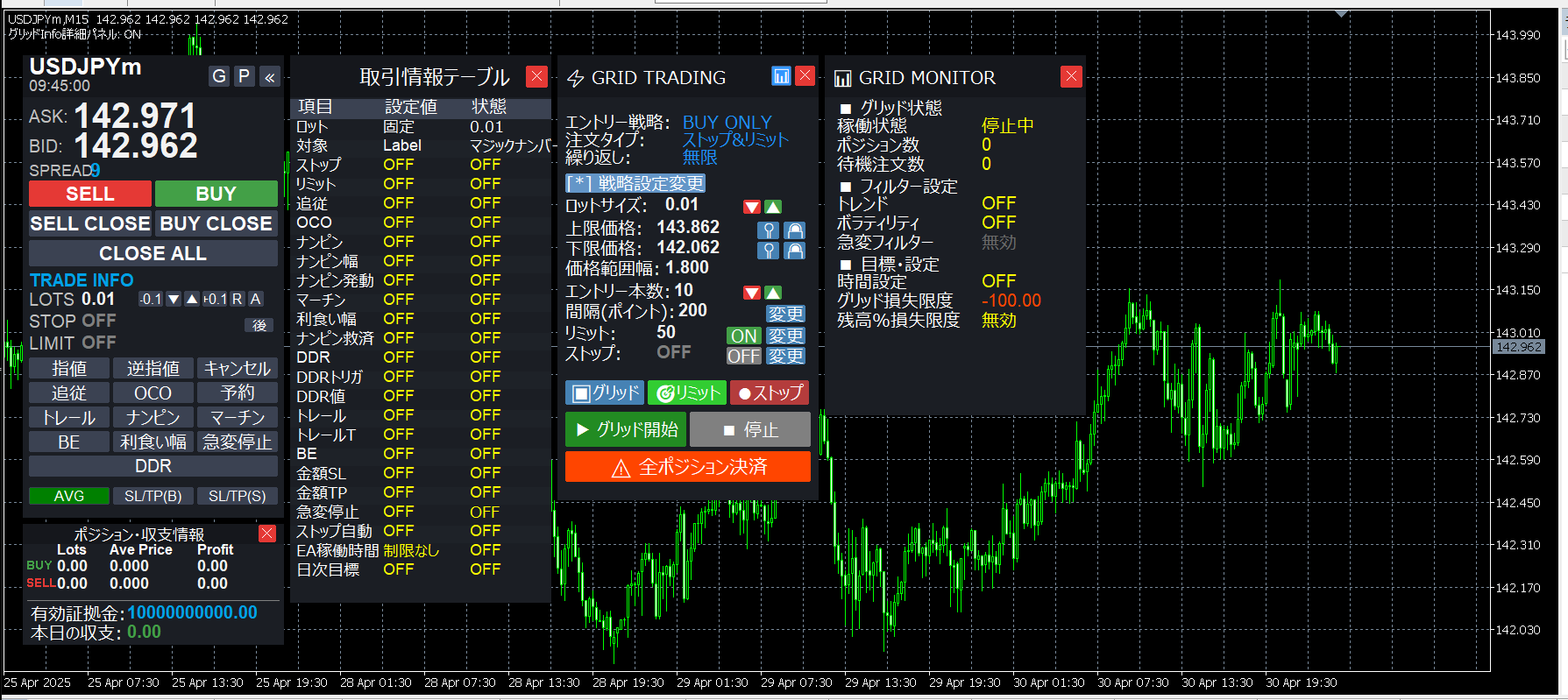
? Backtesting also works with a semi-discretionary EA "ELDRA Panel Complete Strategy" Automatic and manual the strongest tag finally released!
? Semi-automatic EA that works in backtesting
“EA is fully automatic, so it can’t adapt to market changes, right?”
“Backtesting and live trading yield completely different results...”
An EA that overturns that conventional wisdom: ELDRA is revolutionary!
Traditional EAs offered only two choices: “100% automatic” or “100% manual.” But ELDRA has“Semi-automatic EA”established as a new category. It perfectly fuses the judgment of pro traders with the execution power of an EA, making itthe next generation of automated trading systemstruly.
✨ Why is ELDRA overwhelmingly superior?
? 1. Fully functional in backtesting
Many panel features don’t work properly in backtest environments. ELDRA uses its own algorithm to allow panel operations in the backtest environment to behave exactly as in real time.
⚡ 2. Real-time market judgment
According to market conditions, switch trading strategies with one click. It instantly adapts to trend markets, range markets, and any situation with the optimal settings.
? 3. Intuitive visual panel
Displays complex settings visually. The grid status, risk management, and profit/loss are clearly presented in a beautiful interface.
From here is ELDRA’s true power. A detailed explanation of revolutionary panel functions beyond conventional EAs.
? Main Control Panel
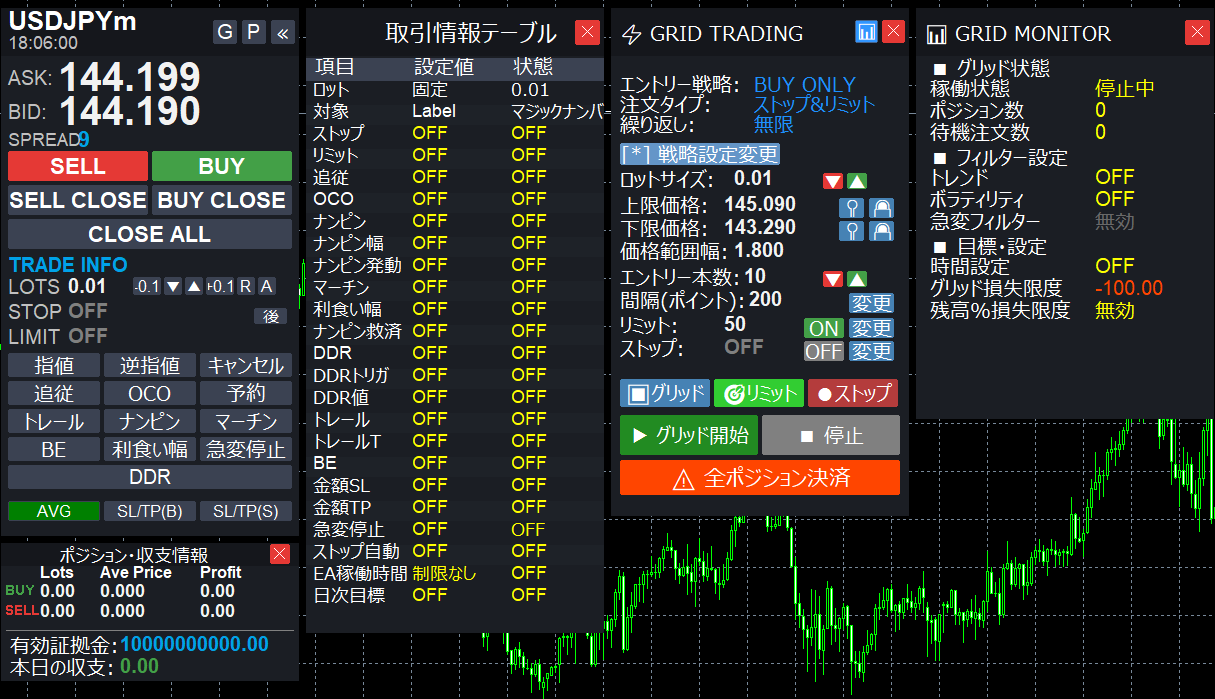
There are so many features that just having anti-martingale would be enough?
A comfort-control panel like a TV remote control!
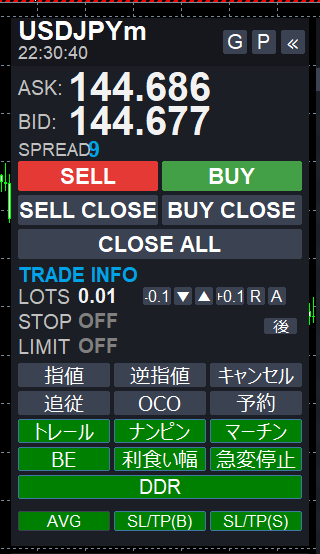
Pressing a button toggles enable/disable.
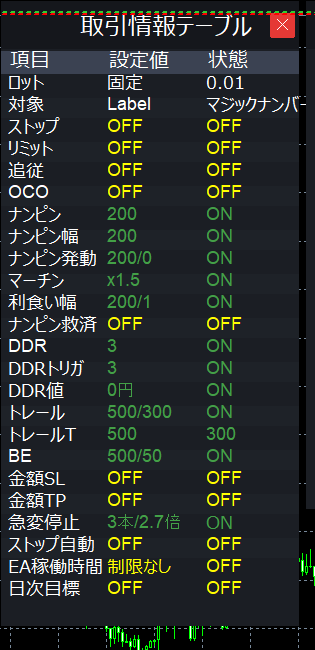
Configuration status is immediately visible
? Grid Management Panel
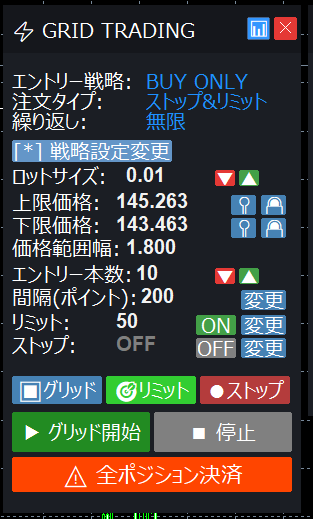
Upper/Lower price settings
Specify precisely via numerical input how many pips up or down from the current price to expand the grid. Includes an auto-calculation function linked to ATR.
Grid interval adjustment
Real-time adjustment of the grid step. Dynamically changes according to market volatility.
Maximum number of grid additions
A key part of risk management. Configurable from 3 to 10 times, optimized for capital management.
? Real-time Information Panel
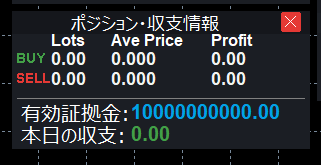
| Item | Displayed content |
|---|---|
| Current position status | Number of positions held, unrealized P/L, required margin |
| Today’s performance | Number of trades, P/L, win rate, maximum drawdown |
? Morning setup check (about 2 minutes)
Step 1: Check market conditions
Check the economic indicators calendar and switch to “Grid OFF” mode if there are major announcements.
Step 2: Check ATR value
If volatility has changed compared to the previous day, adjust the grid spacing.
Step 3: Check risk settings
Recalculate lot size and risk% based on account balance.
? How to respond when a trend appears (about 30 seconds)
If a strong trend is confirmed
- Narrow the grid interval by 20%
- Increase the maximum number of grid additions
- Widen take-profit by 1.5x
? Optimization in range markets (about 30 seconds)
If a sideways market is confirmed
- Widen the grid interval by 10%
- Narrow the take-profit
- Reduce grid additions to lower risk
❌ Critical issues with traditional EAs
Many EAs disable panel features during backtests, leading to results that differ from real trading. This prevents accurate validation.
- Panel operations not reflected
- Real-time adjustment features not functioning
- Backtest results diverge from live trading
✨ ELDRA’s revolutionary solutions
1. Automatic parameter loading
At the start of a backtest, configured parameters are automatically reflected in the panel settings.
2. State preservation/restoration system
Panel state is saved in real time and fully reproduced in the backtest environment.
3. Full visual mode support
Even in the visual mode of backtesting, the same panel operations appear on screen.
[Insert backtesting execution screen screenshot here]
? Correct procedure for running backtests
Step 1: Parameter setup
Set parameters in Strategy Tester (these values auto-reflect to the panel)
Step 2: Choose visual mode
Always run tests in visual mode (to confirm panel display)
Step 3: Real-time verification
During testing, observe panel behavior and confirm it matches live operation
?️ “Three-stage risk management” technique
| Level | Risk | Grid interval | Maximum grid additions | Daily loss limit |
|---|---|---|---|---|
| Conservative | 2% of account | ATR × 2.0 | 5 | 1% |
| Standard (recommended) | 3% of account | ATR × 1.8 | 7 | 2% |
| Aggressive | 5% of account | ATR × 1.5 | 8 | 3% |
⏰ “Time-of-day optimization” strategy
? Tokyo time (9:00-15:00)
- Low volatility: narrow grid intervals
- Many range markets: reduce take-profit
? London time (16:00-24:00)
- High volatility: wider grid intervals
- Frequent trends: expand take-profit
? NY time (22:00-6:00)
- Highest volatility: set maximum risk
- Many important indicators: MANUAL mode recommended
⚠️ Trap 1: Emotion-driven setting changes
❌ Example of what not to do
Increase grid additions the moment you incur a loss
✅ Correct approach
Strictly adhere to pre-set rules. Avoid emotional changes
⚠️ Trap 2: Overreliance on backtest results
❌ Example of what not to do
Run with large lots just because backtests looked good
✅ Correct approach
Start with a minimum lot for one month of live trading and compare with backtests
⚠️ Trap 3: Excessive optimization
❌ Example of what not to do
Change panel settings daily, resulting in inconsistent trades
✅ Correct approach
Adjust only about once a week, with a clear rationale
✨ Shocking results are continually arriving!
? E (employee, 38)
“With semi-automatic functionality, I can finely adjust to market conditions, and monthly returns rose from 12% to 28%! The response to trends improved dramatically.”
? F (full-time trader, 45)
“Backtests and live results almost match, so strategy validation is precise. I’ve tested 10+ EAs, but ELDRA is the best.”
? G (housewife, 29)
“The panel is intuitive, even a beginner like me could operate it easily. Thanks to risk-management features, I can trade with confidence.”
? Beginner: start here (week 1)
- Check basic settings: Understand panel operation with default settings
- Backtest in visual mode: Verify operation over the past month
- Start live trading with minimum lot: 0.01 lot, observe for a week
? Intermediate: level up (weeks 2-4)
- ATR-linked settings: Dynamic adjustments based on volatility
- Time-of-day optimization: Settings adjusted for each session
- Incremental risk increases: Gradually increase lot size
? Advanced: professional level (from month 2 onward)
- Operate on multiple currency pairs simultaneously: Diversify risk with low-correlated pairs
- Strategy by market condition: Settings for trends, ranges, and volatility
- Establish your own rules: Build your own optimization rules
? Daily checks
- ☐ Check economic indicators and adjust mode
- ☐ Monitor ATR changes and adjust grid spacing
- ☐ Track daily P/L and goal attainment
? Weekly checks
- ☐ Analyze performance and review settings
- ☐ Compare backtest results with live trading
- ☐ Ensure compliance with risk management rules
? Monthly checks
- ☐ Summarize monthly results and adjust strategy
- ☐ Consider new optimization methods
- ☐ Recalculate lot sizes based on account balance
ELDRA’s semi-automatic system goes beyond mere automated trading“Intelligent Trading System”where your judgment and the EA’s execution power fuse to enable flexible and precise trading that was previously impossible.
? With full backtest compatibility, optimization can be done in a consistent environment from strategy validation to live trading?
No longer will you hear that “EA is inflexible.” Master ELDRA’s panel and step into the realm of pro traders.
ELDRA will fully support your path to success!
? Next preview: exposing further secret techniques
“ELDRA × multiple timeframes to win 95%? The master of timeframes uses forbidden synchronization techniques”
We plan to fully reveal the ultimate method of synchronizing ELDRA across different timeframes (M15, H1, H4) to maximize the strengths of each timeframe. The essence of multiple timeframes will finally be unveiled...!